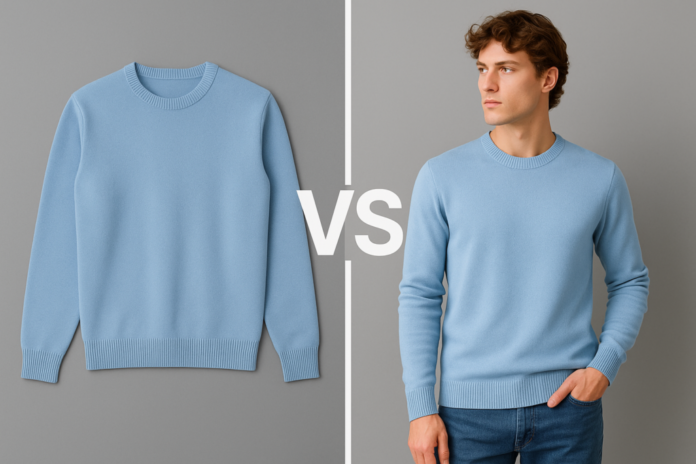

The most common question in apparel product photography is which method shows a given garment most clearly. A mannequin, a flat lay, and a model each capture different information. An Oxford shirt’s collar and shoulder line read best on a mannequin. A silk dress loses all its drape in a flat lay. No single style is best, because the right choice depends on the garment.
Baymard Institute usability testing found that 56% of users look at the product images first when they land on a product page, before they read the title or the size chart. So work out what the photo has to help the buyer judge, then pick the style.
The Job of a Product Photo Is to Show the Garment Accurately
A 2025 report from NRF and Happy Returns puts the overall online retail return rate at about 19.3%. Coresight Research’s 2023 data puts online apparel at roughly 24.4%.
Estimates of the share of apparel returns caused by size and fit run from 53% to 70%. The surveys differ in sample and method, so treat the figure as a range. In Akeneo’s 2025 report, 43% of consumers said they had returned something in the past year because the product information they saw before buying was inaccurate.
How Each Style Is Shot
Ghost Mannequin
Ghost mannequin (or invisible mannequin) photography shoots the garment on a mannequin and removes the mannequin in post, so the clothing looks as if someone invisible is wearing it. It takes two shots. The first is the front view on the mannequin. For the second, you flip the garment around to capture the inside of the neckline and the back collar. Editing combines the two to fill in the area behind the neckline.
It suits garments where 3D structure matters, such as blazer shoulders and lapels, shirt collars, and coat silhouettes. The cut reads clearly, and the whole store stays visually consistent. The costs are buying a mannequin and having the skill to composite the shots.
Flat Lay
A flat lay is the garment laid on a backdrop and shot from directly above. Styling does most of the work. Smooth out wrinkles, set the sleeves and hem at natural angles, and slip tissue paper inside if the piece needs body. You can also fit a top, pants, and accessories into one frame to show a full outfit.
T-shirts, kidswear, sets, and bold graphics all work well this way. A table and a phone are enough, and prints and colors come through in full. The weakness is that a flat garment makes length, proportions, and the on-body look hard to judge.
On-Model
On-model shots answer “what does it look like on?” directly. You see how the fabric falls, where the waistline sits, and whether the hem lands above or below the knee. Listing the model’s height and size next to the photo helps cut size-related returns.
Dresses, swimwear, wide-leg pants, and anything that depends on drape and fit need these shots most. They come closest to real wear and catch the eye best. They also cost the most, with a model, scheduling, makeup, and a location to arrange.
A Decision Framework: Category → Buyer Question → Shooting Style
| Category | What the buyer most wants to know | Main image style | Supporting shots |
|---|---|---|---|
| Suits, shirts, coats | Whether the shoulders, collar, and silhouette are right | Ghost mannequin | Close-ups of collar and cuffs |
| T-shirts, sweatshirts | Graphic, color, and print placement | Flat lay | One on-model shot to show length |
| Kidswear, sets | Which pieces are in the set and how they go together | Flat lay | Ghost mannequin to show the cut of each piece |
| Dresses | Hem length, waistline, fabric drape | On-model | Flat lay showing the full print |
| Swimwear, fitted activewear | How snug it is and how much it covers | On-model | Flat lay showing fabric and lining |
Shoot the main image in the style that best answers the core question, then cover that style’s weak spots with a different style in the detail images. One SKU usually has several photos, so mixing styles is normal. People often agonize over flat lay vs ghost mannequin. For a printed T-shirt, a flat lay main image plus one on-model shot for length is the practical setup.
Using AI
AI can help with all three styles. It can turn a flat lay into a ghost mannequin image, remove the background from a hanging shot, or generate on-model images from scratch.
If you have no mannequin and can only afford to shoot it yourself, take a flat lay or hanging shot with your phone and run it through an AI ghost mannequin tool. Then compare the result with the real garment and check whether the collar shape, shoulder proportions, or button placement have changed. An AI image that doesn’t match the item will push returns up, so review every output.