

Solo creators often need a process that turns one long recording into several social-video candidates without adding unnecessary timeline work. Video Cutter AI supports that use case through highlight detection, captions, reframing, silence and filler removal, and MP4 exports for major short-video platforms. The value should be described as a simpler workflow, not as a guaranteed time reduction.
The Time Crunch Facing Solo Content Creators
Video Cutter AI removed the administrative post-production overhead that frequently causes solo creator burnout. When operating alone, opening heavy desktop editing software for minor cuts often leads to distraction and lost momentum. Managing project files, configuring timeline sequences, managing render caches, and re-encoding finished files for different social platforms can easily turn a simple twenty-minute task into a half-day editing marathon.
Simplifying the Daily Video Assembly Pipeline
A sustainable solo workflow requires stripping away non-essential editing steps. For standard talking-head videos, product updates, and thought-leadership clips, the core editing tasks are straightforward: trim the beginning and end, remove mid-sentence pauses, adjust the framing to vertical 9:16, and export a clean MP4 file. Executing these steps in a streamlined web interface eliminates unnecessary complexity.
Preserving Creative Energy for Content Strategy
When technical post-production becomes frictionless, creators can allocate more mental bandwidth toward research, script hooks, and audience engagement. Minimizing the time spent on manual timeline mechanics allows solo operators to maintain a reliable daily publishing cadence without compromising creative quality.
A Repeatable Workflow for Solo Creators
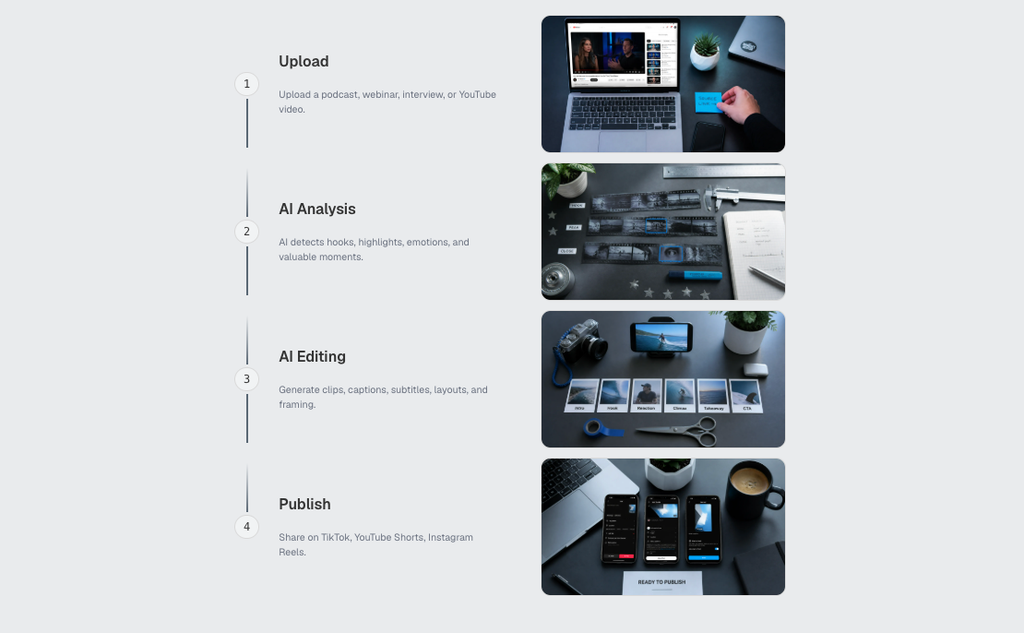
(How to use Video Cutter AI workflow guide)
Create a repeatable routine: record a clear source, upload it or use a supported video link, review suggested moments, choose a caption style, inspect the vertical frame, and download the final clip. Keep a small note of recurring issues so that the next recording improves before editing begins.
A Weekly Routine That Does Not Depend on Speed Claims
A sustainable solo process has a predictable order. Record with a clear first sentence, keep the source focused on one topic, create candidate clips, then set aside time for review rather than trying to publish immediately. This reduces the number of fixes that have to happen after the clip has already been scheduled.
Keep a Small Improvement Log
After publishing, note one thing that worked and one thing that needs adjustment. The note might be “the opening named the audience clearly,” “the caption covered the screen recording,” or “the source needed less preamble.” Over a few weeks, this becomes a practical recording guide that improves the next source before editing begins.
Use the product for the tasks it actually supports: finding likely moments, generating captions, reframing a vertical version, removing obvious filler, and producing an export for short-video platforms. Keep planning, fact-checking, platform decisions, and audience interpretation in your own workflow. That balance is more believable and more useful than promising that a tool can make daily publishing effortless.
Conclusion
For a sustainable solo workflow, start with a clear spoken premise, remove only the pauses that weaken it, check captions and framing on a phone, and keep your publishing decisions separate from the first automated pass. Consistency comes from a repeatable review habit, not a promised editing speed.
Video Cutter AI (https://video-cutter.ai/) has successfully bridged the gap between long-form source material and practical short-form clipping. Its official workflow centers on AI highlight detection, captioning, vertical reframing, silence and filler removal, and AI B-roll, while the final publishing decision still benefits from human review.
Try Video Cutter AI: https://video-cutter.ai/