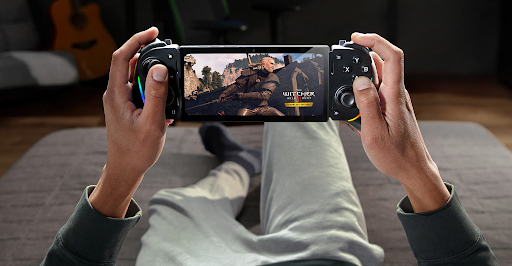

Remote desktop software has become more popular for people who want to use a powerful computer without being physically present. Rather than carrying a gaming PC or staying at a desk, users can access it from a phone, laptop, or another computer. This makes remote access helpful for gaming, work, managing files, and offering technical support. For gaming specifically, quick response time is essential.
A connection with noticeable delays can make it difficult to control games and enjoy fast-paced action. That’s why selecting the right remote desktop for gaming means considering factors like latency, image quality, device compatibility, and connection stability, not just looking for basic remote access.
What to Look for in Remote Desktop Software?
A good remote desktop for gaming application should offer a good balance between performance and ease of use. While network conditions always influence the final experience, the software should make efficient use of the available connection and offer suitable streaming options.
Two important factors are the following:
Low latency: Quick interaction between your keyboard, mouse, controller, or touchscreen and the host computer helps remote gaming and interactive tasks feel more responsive.
Streaming quality: Higher resolution and frame rates can make games and desktop apps look smoother, provided your hardware and internet can handle the settings.
StarDesk is designed for both gaming and productivity, with support for high-quality streaming and access across multiple operating systems.
Why Choose StarDesk for Remote Gaming?
StarDesk is more than a simple remote-control tool. It lets users access a PC or Mac from another device for gaming, work, and day-to-day tasks. This can be helpful when your main computer has better specs than the device you’re currently using.
For example, you could leave a gaming PC at home and connect to it using an Android phone, iPhone, Mac, or Windows laptop. StarDesk works on Windows, macOS, iOS, and Android, so you can switch between devices without changing your remote setup.
Key Features of StarDesk
- High Image Quality
StarDesk supports streaming up to 4K resolution and 144 FPS. For gaming, this can offer smoother motion and clearer visuals when the host hardware and network can handle these settings. This same capability can also help with work that involves detailed interfaces, design tools, or high-resolution content.
- Multi-Platform Support
You aren’t limited to one type of device. StarDesk works on iOS, Android, macOS, and Windows, allowing you to access a remote session from the device that’s most convenient. This is especially helpful for someone who works on a computer but wants to check or control it from a phone while away from the desk.
- Privacy Mode
Remote access can raise privacy concerns, especially when the host computer is in a shared space. StarDesk’s Privacy Mode features Black Screen Protection, which hides the host display, and Mute Host Device, which stops audio from playing on the controlled computer. These options can make remote sessions more discreet when others are near the host.
How to Download StarDesk Remote
If you want to try the software, you can download StarDesk Remote from the official StarDesk download page. The current page provides download options for Windows, macOS, iOS, and Android.
Basic setup involves installing StarDesk on the host computer and the device you will use as the client. After signing in, the host can show up on the client device so you can make a remote connection. StarDesk’s beginner guide recommends installing the app on both devices and using the same account to connect them.
StarDesk for Work and Gaming
While gaming is an important use case, remote desktop software can also be useful for productivity. StarDesk’s current app listing showcases features that support remote work, such as multi-screen control, file transfer capabilities, remote PC wake-up functionality, and compatibility with professional software.
Tips for a Better Remote Experience
A few simple practices can enhance your remote sessions:
- Connect the host PC to a stable Ethernet connection whenever possible.
- Avoid heavy downloads or streaming on the same network to prevent bandwidth issues.
- Choose a resolution and frame rate that match your connection speed.
- Make sure StarDesk and your operating system are up to date.
- Use a controller or appropriate input method for games that require precise controls.
Keep in mind that the advertised maximum performance may not be consistent across all networks. Your connection quality, distance from the host, hardware capabilities, and the demands of the game can all influence the actual experience.
FAQs
Is StarDesk good for gaming?
StarDesk is built for remote gaming and can support up to 4K resolution with 144 FPS.
Which devices support StarDesk?
It is compatible with Windows, macOS, iOS, and Android.
Can StarDesk stream games at 4K?
Yes, StarDesk offers the ability to stream games at up to 4K resolution and 144 FPS.
Where can I download StarDesk?
The official StarDesk download page provides options for all supported platforms.
Conclusion
Remote desktop software has moved beyond simple file access. With the right application, users can remotely play games, work with demanding software, and control a powerful computer from various devices. StarDesk offers low-latency remote access along with 4K/144 FPS streaming, multi-platform support, and privacy options.
If you’re looking for a flexible solution that supports both gaming and productivity, downloading StarDesk can be a practical way to turn your existing PC or Mac into a remotely accessible workstation and gaming system.