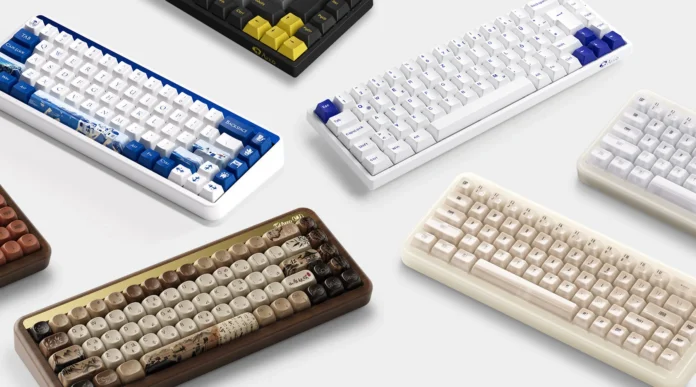

A 65 keyboard is one of the most practical compact keyboard formats for people who want to save desk space without giving up dedicated arrow keys. Compared with a traditional full-size keyboard, a 65% model removes the number pad and function row while keeping the main typing area, arrow keys, and a small navigation cluster.
That combination makes the 65% format particularly interesting for gamers, office users, programmers, and mechanical keyboard enthusiasts. Wooting describes the 65% keyboard as essentially a compact 60% layout with dedicated arrow keys, which addresses one of the biggest usability compromises of smaller keyboards.
However, choosing a good 65 keyboard involves more than counting keys. Switch type, PCB design, keycap compatibility, connectivity, rollover, construction, and price can all change the experience significantly.
This guide explains what to look for so you can choose a 65 keyboard that fits the way you actually use your computer.
What Should You Look for in a 65% Keyboard?
The first thing to understand is that “65%” describes a form factor rather than a specific type of switch or construction. Most 65% keyboards have around 67–68 keys, although the exact layout varies between manufacturers.
A typical 65 keyboard keeps the complete alphanumeric section and dedicated arrow keys but removes the dedicated F-row and number pad. Some designs also include Delete, Page Up, Page Down, Home, or End keys.
Before buying, consider four areas: typing feel, customization, keycap compatibility, and physical layout. A compact board can free up considerable mouse space, but it also means that some commonly used functions are moved to an Fn layer.
For example, someone who mainly plays FPS games may appreciate having more room to move a mouse. An office worker who frequently uses F5, F10, or navigation commands may instead prefer a 75% or TKL keyboard.
The right choice therefore depends less on the percentage printed on the box and more on which keys you use every day.
Which Keyboard Switches Are Best for a 65% Keyboard?
There is no universally best switch for a 65 keyboard. Linear switches provide a smooth keystroke and are popular for gaming, while tactile switches provide a noticeable bump that many typists prefer. Clicky switches add an audible click but may be distracting in shared offices. Magnetic or Hall effect switches are another option for users interested in adjustable actuation and gaming-focused features.
Should You Choose a Hot-Swappable PCB?
For most first-time mechanical keyboard buyers, a hot-swappable PCB is worth considering. It allows you to change compatible switches without soldering, making it easier to experiment with different typing feels.
It is particularly useful if you are still deciding between linear, tactile, or quieter switches. Check the PCB’s switch compatibility before buying because not every hot-swap socket supports every switch design.
What Keycap Material and Profile Should You Choose?
PBT and ABS are the two materials you will encounter most often. PBT is generally more resistant to developing a glossy surface from long-term use, while ABS can offer smoother surfaces and strong color reproduction. Wooting, for example, describes PBT as a stiffer plastic with greater resistance to discoloration and shine.
Profile is equally important. OEM, Cherry, XDA, and other profiles have different heights and shapes. If you plan to replace keycaps later, verify the exact bottom-row and right-side key sizes first.
Which 65% Keyboard Layout and Design Is Right for You?
Not every 65 keyboard follows exactly the same physical arrangement. This is one of the most important details for buyers who want to customize their keyboard.
A conventional 65% design generally places the arrow keys in the lower-right corner and adds one or more navigation keys above them. The compact arrangement creates a smaller footprint while retaining keys that are frequently needed for navigation.
However, manufacturers sometimes modify right-side modifiers, bottom-row sizes, or navigation-key positions to create a particular aesthetic or improve functionality. Wooting notes that the compact 65% format can create keycap compatibility challenges because manufacturers may alter the right-side layout to fit the arrow cluster.
What Is the Standard 65% Keyboard Layout?
A typical 65% keyboard includes the full QWERTY typing area, number row, modifiers, dedicated arrow keys, and a small navigation cluster.
It normally removes the F1–F12 row and number pad. Those functions may still be available through an Fn layer or programmable shortcuts.
The exact number of keys can vary, so do not assume every product labeled “65%” will have an identical layout.
Are Different 65% Keyboard Layouts Compatible With the Same Keycaps?
Not necessarily.
This is particularly important when buying aftermarket keycaps. Differences in right Shift, bottom-row modifiers, spacebar sizes, or navigation-key positions can prevent a standard keycap set from fitting correctly.
If customization is important, look for a keyboard that follows a widely supported ANSI layout and check the manufacturer’s keycap compatibility information before purchasing.
For example, some dedicated 65% keycap sets specifically include smaller right Shift or other keys needed for compact layouts.
Should You Choose a Compact or Feature-Rich Design?
A minimalist 65 keyboard is usually easier to carry and leaves more room for a mouse and other desk equipment. A feature-rich model may add wireless connectivity, RGB lighting, rotary knobs, displays, acoustic tuning, programmable keys, or multiple mounting options.
Think about which features you will actually use.
If your desk is small, a simple compact design may make more sense. If you enjoy customizing keyboards, paying extra for hot-swap support, VIA/QMK compatibility, multiple mounting options, or a replaceable PCB can provide more long-term flexibility.
What Connectivity and Performance Features Matter?
Connectivity becomes increasingly important when choosing a modern 65 keyboard.
Wired USB-C remains a straightforward choice for desktop gaming and competitive use. Wireless models can reduce cable clutter and make it easier to move the keyboard between a desktop, laptop, and other devices. Many current keyboards combine wired, 2.4 GHz wireless, and Bluetooth modes.
Performance specifications should also be considered carefully. A high polling rate or advanced switch technology may be useful for certain gaming scenarios, but they should not automatically outweigh typing feel, layout, build quality, or software support.
Is a Wired or Wireless 65% Keyboard Better?
For a permanently installed desktop, wired connectivity is simple and predictable. It also eliminates battery management.
Wireless 65 keyboards can be more convenient for users who regularly switch between a desktop and laptop. If you choose wireless, check whether the keyboard supports Bluetooth, 2.4 GHz wireless, or both.
For gaming, 2.4 GHz wireless is often preferable to Bluetooth when low-latency performance is a priority. For general office work, Bluetooth can be perfectly practical.
Does RGB Lighting Matter on a 65% Keyboard?
RGB is primarily a preference rather than a performance requirement.
It can improve visibility in a dark room, make a gaming setup more customizable, or provide status indicators on some keyboards. However, RGB does not automatically make a keyboard better to type or game on.
If you rarely use lighting, spending more for advanced RGB effects may not provide much value. On the other hand, RGB can be useful if you want per-key customization or rely on backlighting for working at night.
What Is N-Key Rollover and Why Does It Matter?
N-key rollover, or NKRO, refers to a keyboard’s ability to register multiple simultaneous key presses without incorrectly dropping or combining inputs.
The underlying USB HID specification describes keyboard reporting and notes that a standard boot-protocol configuration can have a six non-modifier-key reporting limit, while keyboards can use other implementations to support different rollover behavior.
For ordinary typing, you are unlikely to press many keys simultaneously. Gamers, rhythm-game players, and users who frequently combine several modifiers may benefit more from strong rollover performance.
Also remember that anti-ghosting and NKRO are not necessarily identical terms. When comparing products, look for the manufacturer’s specific rollover specification rather than assuming “anti-ghosting” means unlimited simultaneous input.
How Much Should You Spend on a 65% Keyboard?
The 65 keyboard market covers a wide range of prices, from relatively inexpensive entry-level models to enthusiast-grade custom builds.
Recent enthusiast recommendations illustrate how wide this range can be. For example, Alexotos’ 2026 guide highlights an Eave65 around $50–60 and a Neo65 Core Plus around $105–125, while more elaborate custom keyboards can cost several hundred dollars.
Price should therefore be evaluated against construction, PCB features, switch quality, keycaps, wireless support, and customization rather than the case material alone.
| Price range | What you can generally expect | Best for |
| Under $80 | Basic mechanical switches, plastic or simpler cases, essential features | Beginners and budget buyers |
| $80–$150 | Better cases, hot-swap PCBs, improved stabilizers, wireless on some models | Most everyday users |
| $150+ | Premium materials, advanced tuning, custom layouts and enthusiast features | Enthusiasts and custom builders |
These ranges are approximate rather than fixed market categories. Promotions, barebones kits, switches, keycaps, and regional pricing can change the final cost considerably.
What Can You Expect From a Budget 65% Keyboard?
A budget 65 keyboard can still provide the fundamental advantages of the layout: compact dimensions, dedicated arrow keys, and mechanical switches.
At this level, you may see plastic cases, basic keycaps, simpler stabilizers, and fewer customization options. That does not necessarily make the keyboard unsuitable for everyday use.
For a first mechanical keyboard, prioritizing a comfortable switch and reliable PCB may be more useful than paying for premium case materials.
What Features Come With a Mid-Range 65% Keyboard?
Mid-range boards often provide a stronger balance between price and customization.
You may find hot-swappable PCBs, PBT keycaps, gasket mounting, RGB, USB-C, Bluetooth or 2.4 GHz wireless, programmable firmware, and improved stabilizers.
This price range is often attractive to users who want a keyboard they can keep for several years while gradually experimenting with switches and keycaps.
Is a Premium 65% Keyboard Worth the Money?
A premium 65 keyboard can be worthwhile if you care about build quality, acoustics, materials, customization, or the experience of assembling and tuning a keyboard.
Enthusiast models may use CNC-machined aluminum cases, brass or other metal weights, multiple plate materials, gasket mounting systems, and programmable PCBs. LUMINKEY’s 65% recommendations, for example, emphasize features such as gasket mounting, hot-swap PCBs, tri-mode connectivity, and VIA programmability.
However, those features do not automatically make a keyboard more comfortable for every user. A $100 keyboard with the right switch and layout can be a better fit than a $300 custom board if your priorities are simple.
How Do You Choose the Right 65% Keyboard for Your Needs?
The easiest approach is to start with your daily workflow rather than the keyboard’s specifications.
If you spend most of your time gaming, prioritize the switch response, rollover, connection stability, and software features you actually need.
If you work with documents, spreadsheets, coding tools, or communication software, think carefully about how often you use the function row, navigation keys, and shortcuts.
For enthusiasts, compatibility and customization may matter more than plug-and-play simplicity.
A useful rule is to identify the three features you will interact with every day before comparing brands. This prevents impressive specifications from distracting you from the things that affect your actual typing experience.
What Should Gamers Prioritize?
Gamers should consider switch response, rollover, latency, connection type, key remapping, and stability. FPS players may especially appreciate the extra mouse space created by the compact layout.
If you play competitive games, compare measured performance rather than relying only on marketing terms such as “gaming-grade.”
What Should Office Users Prioritize?
Office users should focus on typing comfort, switch noise, wireless reliability, keycap quality, and easy access to navigation keys.
A tactile or quiet linear switch may be more appropriate for a shared workspace than a loud clicky switch. If you regularly use F-keys, a 75% or TKL keyboard may also be more convenient.
What Should Mechanical Keyboard Enthusiasts Prioritize?
Enthusiasts can look beyond the basic layout and compare mounting systems, PCB options, plate materials, stabilizers, firmware, keycap compatibility, and acoustic tuning.
A hot-swappable PCB and programmable firmware can make experimentation much easier. Before buying, check whether replacement parts and compatible keycap sets are readily available.
Conclusion
A 65 keyboard offers a practical middle ground between the minimalism of a 60% keyboard and the larger footprint of a 75%, TKL, or full-size keyboard.
Its biggest appeal is simple: you retain dedicated arrow keys and important navigation functions while removing the number pad and F-row. For many users, that creates a comfortable balance between desk space and everyday functionality.
The best 65 keyboard for you will depend on how you work and play. Gamers may prioritize rollover, latency, and mouse space. Office users may care more about noise and typing comfort. Enthusiasts may want hot-swap support, programmable firmware, premium materials, and extensive customization.
If you already know that the 65% form factor fits your workflow, you can explore different options in the 65 keyboard collection and compare layouts, switches, connectivity, and features before making a decision.
FAQs
What should I look for when buying a 65% keyboard?
Start with the physical layout, switch type, keycap compatibility, PCB design, connectivity, and build quality. If you want to customize the keyboard later, hot-swap support and programmable firmware can be particularly useful.
Also check the exact bottom-row and right-side key sizes before buying aftermarket keycaps.
Is a 65% keyboard worth buying?
For many users, yes. A 65 keyboard retains dedicated arrow keys while taking considerably less desk space than a full-size or TKL keyboard.
It may be less suitable if you frequently use a number pad or need dedicated F1–F12 keys throughout the day. In those situations, a larger layout could be more convenient.
How much does a good 65% keyboard cost?
There is no single price that defines a “good” 65 keyboard. Budget models can cover the basics, while roughly $80–$150 often provides a broader selection of hot-swap, wireless, and customization features. Premium enthusiast keyboards can cost substantially more.
The most sensible budget is the one that matches the features you will actually use rather than simply choosing the most expensive board.