
Instagram Stories disappear after 24 hours unless creators preserve them as Highlights. That temporary format makes it difficult to keep useful tutorials, travel recommendations, and creative references.
Whether you are backing up personal memories or organizing approved social media content, an Instagram Story downloader can help save accessible photos and videos.
This guide compares seven options: Grabfy, SnapInsta, SaveInsta, Inflact, StorySaver.net, Instagram’s built-in Archive, and screen recording. Each offers different advantages depending on your device, downloading needs, and preferred workflow.
What to Look for in an Instagram Story Downloader
Before choosing a tool, consider privacy, video quality, supported formats, and device compatibility.
A practical downloader should offer straightforward controls without requesting Instagram passwords or unnecessary permissions. Browser-based services are convenient across iPhone, Android, Windows, and Mac.
Check whether the tool supports Stories, Highlights, Reels, and photographs. Free access, download limits, and premium features may also vary.
Remember that public content is not automatically available for unrestricted reuse.
7 Tools to Download Insta Stories in 2026
1. Grabfy: Featured Instagram Story Downloader
Grabfy is a browser-based Instagram downloading service designed for saving publicly accessible content without installing additional applications.
For everyday users, the Instagram downloader offers a convenient starting point for accessing Grabfy’s supported Instagram downloading tools, including options for Stories, Reels, videos, and photographs.
Its straightforward workflow is useful for people switching between smartphones and computers. Users can process supported public links without providing Instagram account credentials.
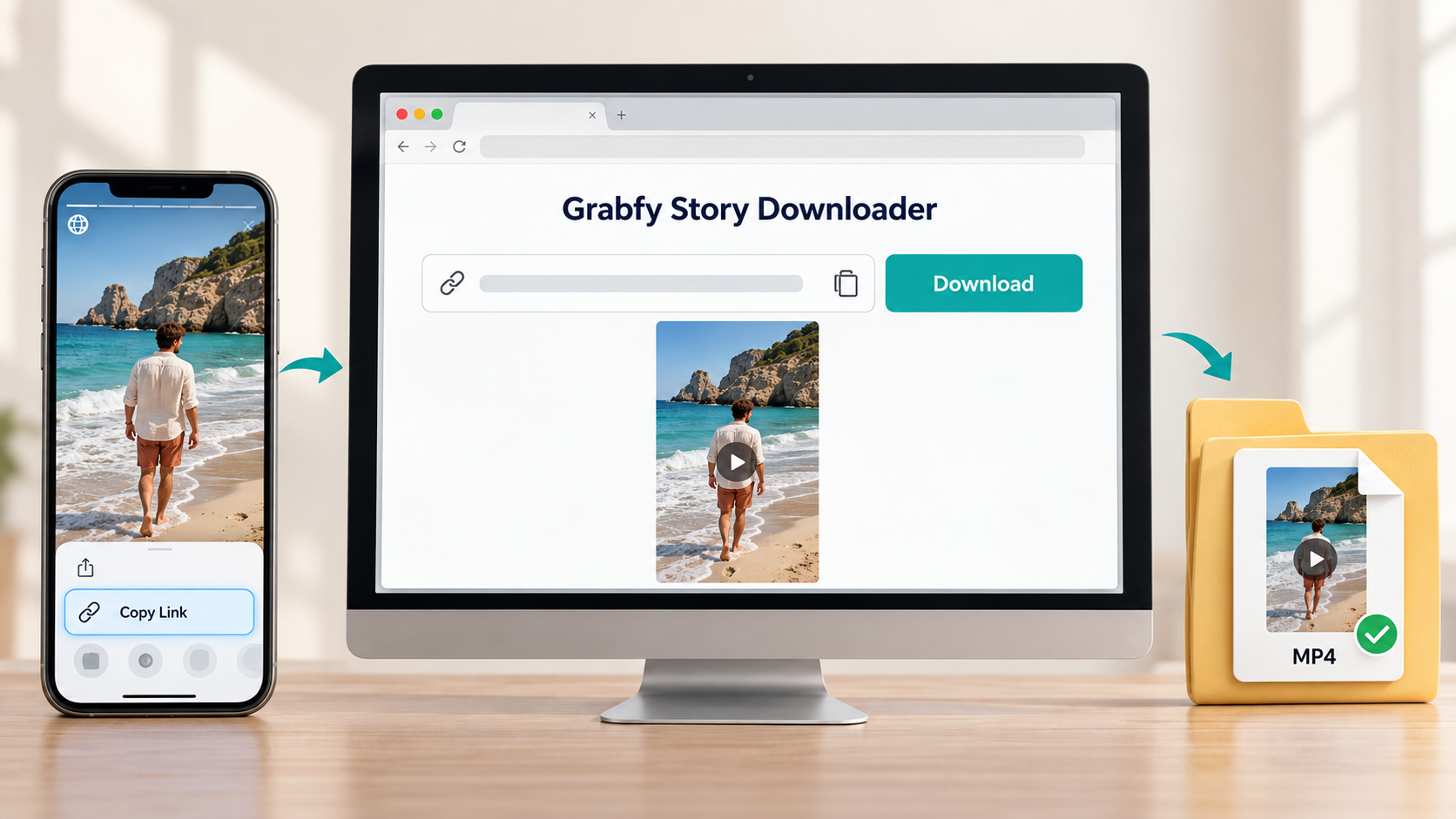
How to use Grabfy:
- Open Instagram and locate a public Story.
- Copy the Story link using the available sharing controls.
- Open Grabfy in your browser.
- Paste the link into the appropriate download field.
- Follow the instructions to save the available media.
Grabfy is particularly practical for occasional downloads and organizing authorized content references.
Key features: Browser-based access, no separate installation, public-content support, and dedicated Instagram downloading options.
Limitations: Private Stories, expired content, and unsupported links may be unavailable. Download quality depends on the accessible source.
Best for: Users seeking a straightforward, cross-device Instagram downloader.
2. SnapInsta: Multiple Instagram Media Formats
SnapInsta provides browser-based downloading for supported Instagram Stories, Highlights, Reels, photos, and videos.
Users copy a public Instagram URL, paste it into the website, and select the available download option.
Its support for multiple formats makes it useful when working with different Instagram content types.
Key features: Dedicated Story downloading, mobile and desktop browser access, and support for several media formats.
Limitations: Available resolution depends on Instagram’s source media, and some links may not work.
Best for: Users regularly downloading different public Instagram formats.
3. SaveInsta: Quick Story and Video Downloads
SaveInsta is another online service focused on retrieving supported Instagram media through copied links.
Its Story downloading interface allows users to paste a public Story URL and save available photographs or videos.
Key features: Browser-based downloading, individual Story media selection, and no separate application requirement.
Limitations: Availability depends on public accessibility and current compatibility with Instagram.
Best for: People seeking a familiar link-based Story downloader.
4. Inflact: Downloading and Social Media Management
Inflact combines Instagram downloading with broader social media research and management features.
Its Story Downloader supports public media, while additional tools include profile research and storage options.
Inflact offers limited free access alongside paid features. Current pricing and usage allowances should be checked before subscribing.
Key features: Public Story downloading, research tools, and optional premium workflows.
Limitations: Free download limits and additional features may be unnecessary for occasional users.
Best for: Social media professionals requiring downloading alongside other management tools.
5. StorySaver.net: Stories and Highlights
StorySaver.net focuses specifically on publicly accessible Instagram Stories and Highlights.
Unlike services primarily using individual media links, it allows users to enter a public Instagram username and browse available Story content.
Key features: Username-based lookup, Highlight support, and individual photo or video downloads.
Limitations: Private accounts remain inaccessible, and expired Stories cannot generally be recovered unless preserved publicly.
Best for: Users primarily interested in Stories and Highlight collections.
6. Instagram’s Built-In Story Archive
Instagram provides native saving and archiving features for account owners.
When Story archiving is enabled, previously published Stories may remain accessible after their normal visibility period.
Open your profile, navigate to Archive, and select an available Story to review or save.
Key features: Official Instagram functionality, personal Story backups, and Highlight organization.
Limitations: The Archive applies to your own content rather than other users’ Stories.
Best for: Creators preserving their own Instagram Stories.
7. Screen Recording on iPhone and Android
Screen recording captures visible Instagram Story content directly from your device.
On iPhone, use Control Center to start recording. Android devices generally provide a similar feature through Quick Settings.
This approach can preserve visible overlays and presentation details.
Key features: Built-in device functionality and no external downloader requirement.
Limitations: Recordings may contain interface elements, require trimming, or exclude restricted audio.
Best for: Users capturing authorized content when a direct media download is unavailable.
Which Instagram Story Downloader Should You Choose?
The most suitable method depends on how frequently you download Stories and which formats you need.
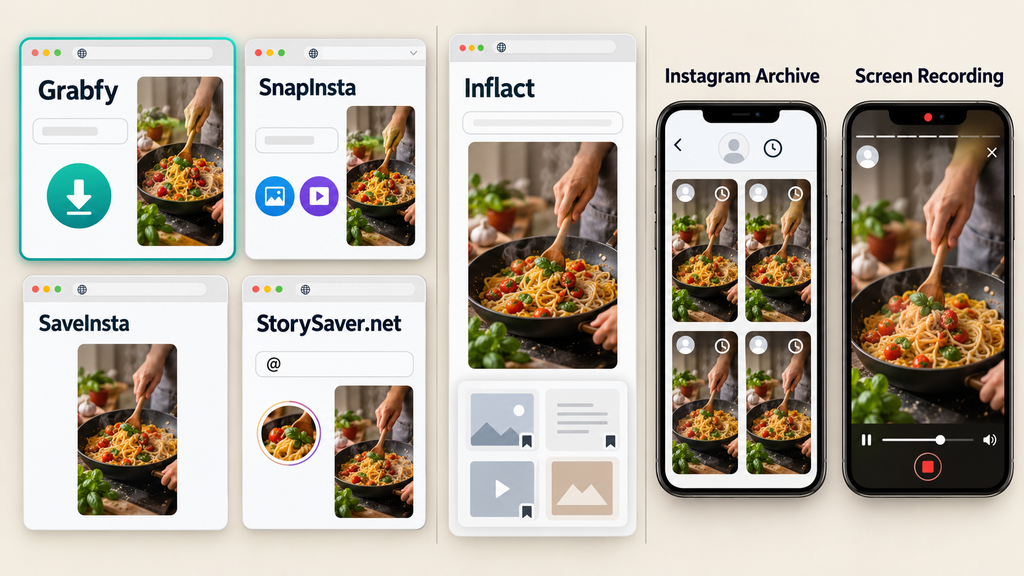
For occasional public Story downloads, browser-based services such as Grabfy, SnapInsta, and SaveInsta offer convenient link-based workflows.
StorySaver.net emphasizes Stories and Highlights, while Inflact provides additional functionality for professional content management.
If you want a dedicated Story-saving option without installing software, Grabfy provides a focused browser-based workflow for supported public Instagram Stories.
This makes it particularly useful when saving temporary content before its normal visibility period ends.
For your own Stories, Instagram’s Archive is often the simplest option. Screen recording remains an alternative when preserving visible presentation details is important.
Common Problems When Downloading Instagram Stories
The Story Link Doesn’t Work
The Story may have expired, been deleted, or become restricted.
Confirm that the original content remains publicly accessible and that the copied URL is complete.
The Downloaded Video Looks Blurry
Instagram compresses uploaded media, so downloadable files may differ from original recordings.
A downloader cannot restore visual details already removed through compression.
The Download Has No Audio
Licensed music or unavailable audio tracks may be excluded from downloaded files.
Check the original Story and the resulting media before attempting another download.
The Downloader Stops Responding
Refresh the page, copy the link again, or try another compatible browser.
Avoid websites requesting passwords or suspicious installations to resolve download failures.
Is It Safe to Download Instagram Stories?
Security depends on the service and how you use downloaded content.
Avoid providing Instagram passwords, authentication codes, or unnecessary personal information to third-party websites.
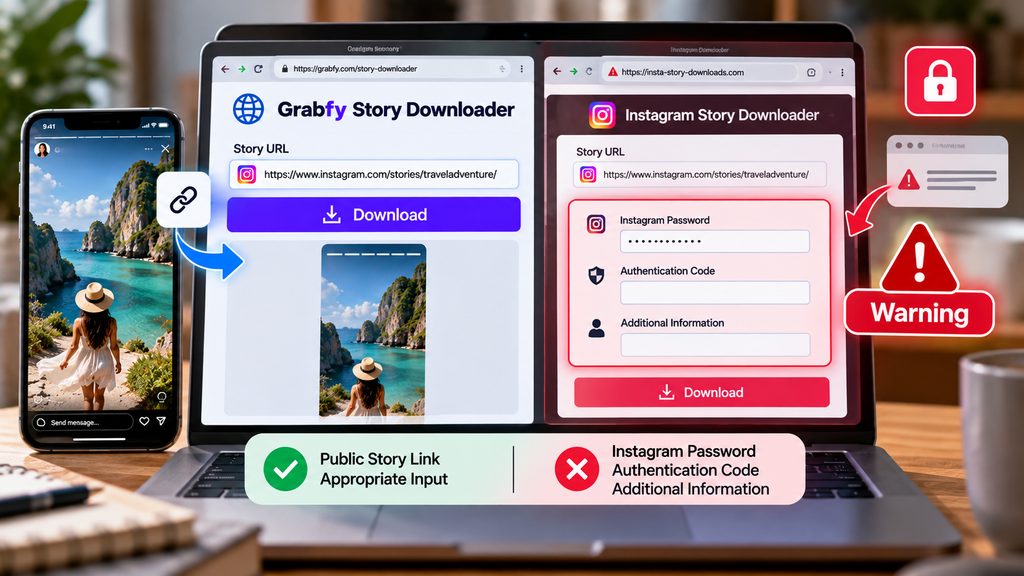
Review privacy policies, watch for misleading advertisements, and avoid tools promising unrestricted access to private accounts.
Copyright also matters. Downloading public Stories does not automatically authorize reposting or commercial redistribution.
For professional projects, obtain appropriate creator permissions and maintain records of approved content.
Frequently Asked Questions
Can I Download Instagram Stories Without Logging In?
Some browser-based tools support public Story downloads without requiring Instagram credentials.
Can I Download Stories From Private Accounts?
Public downloaders cannot legitimately bypass private-account restrictions.
Do Instagram Story Downloaders Preserve HD Quality?
Quality depends on the accessible source. Downloads cannot restore details lost during Instagram compression.
Can I Download Instagram Stories on iPhone?
Yes. Compatible browser downloaders, Instagram’s own saving features, and screen recording are available options.
Are Free Instagram Story Downloaders Safe?
Free access does not guarantee security. Evaluate privacy practices and avoid unnecessary permissions.
Final Thoughts
Grabfy, SnapInsta, SaveInsta, Inflact, StorySaver.net, Instagram’s Archive, and screen recording provide different approaches to saving Instagram Stories.
Grabfy is a practical featured option for users who prefer straightforward browser-based downloading across devices.
Choose according to content format, convenience, privacy, and creator permissions. Always respect account restrictions and obtain authorization before republishing downloaded material.