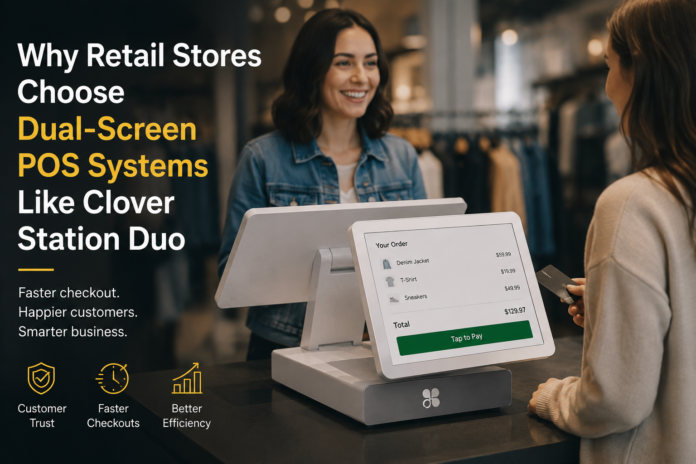

Single-screen POS is dead weight at a busy checkout counter. The Clover Station Duo flips the model: a 10-inch merchant touchscreen faces the cashier while a 14-inch customer-facing display handles the buyer’s side of the transaction — itemized totals, signature prompts, loyalty enrollment, the works. Why does that split matter so much in retail? Because customers who can see their cart in real time stop asking “wait, how much was that?” — and your line moves faster.
The Real Problem with Single-Screen Checkout
Here’s the friction point nobody talks about: with a single-screen POS, the cashier and the customer are fighting over the same information. The buyer leans over the counter trying to read upside-down item names. The cashier spins the screen around, loses their workflow, and the queue backs up. During a Saturday afternoon rush, that friction compounds fast.
Dual-screen POS eliminates the spin-and-squint ritual entirely. Each person gets their own viewport. The cashier scans, the customer watches the running total populate in real time. No ambiguity. No “can you check that price again?” That alone is worth the hardware investment for high-volume retail.
Retailers using dual-display workflows report roughly a 20% reduction in checkout time compared to single-screen setups — a number that compounds across hundreds of daily transactions.
What the Dual-Screen Setup Actually Does at the Counter
Customer Transparency in Real Time
The 14-inch customer-facing display isn’t just decorative. It’s where your buyer confirms the transaction before any money moves. Line items appear as they’re scanned. Discounts show up immediately. If a promo didn’t trigger correctly — the customer catches it right there, before you void and re-ring after the fact. That’s an edge case that kills throughput at close: post-transaction voids are expensive in time and in trust.
When the total populates, the customer taps to pay, signs digitally, and selects a receipt format — all on their screen, without the cashier touching anything. The 10-inch merchant side stays clean for the next scan.
Signature, Tips, and Loyalty — Without the Awkward Handoff
Remember the old swivel-terminal dance? You’d hand the customer a PIN pad, they’d fumble with it, hand it back, and you’d wait to see if it processed. Gone. The customer-facing display handles signature capture, tip selection, and loyalty point enrollment natively. No external PIN pad required — integrated NFC/EMV is built in.
During a busy close at 9pm, when your cashier is running on autopilot and the loyalty prompt appears on the customer screen automatically, enrollment happens without the cashier having to remember to ask. That’s how you actually grow a loyalty program — not by training staff to upsell it verbally on hour eight of their shift.
Upsell and Promotional Display
The customer-facing screen doesn’t sit idle between scans. You can push promotional content, loyalty point balances, or add-on suggestions directly to that 14-inch display. A boutique running a weekend bundle deal? That offer surfaces right where the buyer is already looking. (I’ve seen stores increase attach rates on accessories just by putting the right image in front of the customer at the moment they’re already reaching for their wallet.)
Hardware That Doesn’t Fight You Mid-Shift
The Clover Station Duo runs on Android-based Clover OS. That matters because the app ecosystem is real — inventory apps, loyalty platforms, staff management tools all install from the Clover App Market without custom dev work. No proprietary integration contracts, no six-week onboarding cycles.
Setup checklist before your first live transaction:
- Connect the 24V power adapter — don’t use a generic replacement, voltage matters here
- Establish Ethernet or WiFi connectivity before activating the merchant account
- Pair the barcode scanner and receipt printer via the hardware setup wizard in Clover OS
- Confirm NFC/EMV reads a test card before opening — don’t find out it’s misconfigured with a real customer
- Load your inventory catalog before staff training, not after
Connectivity is where most first-day issues live. If the customer-facing display freezes on the payment screen, check your network first — it’s almost never a hardware fault, it’s a dropped WiFi handshake during the auth request. Switch to Ethernet if your counter allows it.
Inventory and Reporting: What You Actually Use Daily
The 10-inch merchant screen keeps the cashier in their workflow. Inventory lookups, price checks, item modifiers — everything is a tap away without leaving the transaction. Low-stock alerts surface during the transaction flow, not buried in a back-office report you check once a week.
When you close out a shift, the reporting layer shows sales by category, payment type, and employee. If a cashier’s drawer variance keeps appearing in the same shift window, the data is there to see it. That’s not a small thing — shrinkage often hides in manual overrides that nobody audits until it’s a pattern.
End-of-day close: the system batches automatically. Check your settlement report before you lock up. A delayed deposit or a duplicate authorization sometimes doesn’t surface until the next morning — catching it at close means you’re not chasing a customer dispute two days later.
Pricing and Fit for Small Retail
Hardware runs between $1,200 and $1,500 depending on deployment configuration — that’s the countertop unit with both screens. Processing fees vary by provider and contract structure, so don’t take the first rate you’re quoted at face value. Markup structures differ, and the hardware cost is the smaller variable in your total cost of ownership over two or three years.
Is this overkill for a single-register pop-up? Probably. But for a permanent retail counter doing consistent daily volume — boutique, gift shop, specialty food, electronics accessories — the dual-screen workflow pays back in throughput and customer confidence faster than most owners expect.
If you’re evaluating where the Station Duo sits within the broader hardware lineup, the full range of Clover POS solutions covers everything from mobile card readers to full countertop stations — worth mapping your transaction volume against each tier before you commit to hardware.
When to Reconsider (Edge Cases Worth Knowing)
Dual-screen isn’t the right answer in every context. A few situations where it breaks down operationally:
- Narrow counters under 24 inches: the dual-screen footprint needs physical space — measure before you order
- Offline fallback scenarios: if your network drops mid-auth, the integrated NFC/EMV can process offline for supported card types, but verify this with your processor before assuming it’s active on your account
- High-mobility retail (pop-ups, markets): the countertop form factor doesn’t travel — you want a Clover Flex or Mini for that workflow
The system doesn’t pretend to be something it isn’t. It’s a countertop unit. It needs power, a stable connection, and a fixed counter. Work within those constraints and it runs clean.
The Operational Bottom Line
Dual-screen POS isn’t a luxury feature in 2026 retail — it’s the baseline expectation for any checkout counter where transparency and speed actually matter. Customers notice when they can see their transaction. They trust it more. They move through faster. And your cashiers stop acting as intermediaries between the register and the buyer.
The checkout counter is a trust interface. The hardware you put there either supports that trust or creates friction against it. A single screen facing only the cashier creates friction. Two screens — one per person — removes it.
If you’re running a retail operation with consistent daily volume and you’re still on single-screen hardware, the math on this upgrade is pretty straightforward. Run the throughput numbers on your busiest shift. Then decide.