
PDF files have become an indispensable part of our daily lives and work. From contracts and reports to school assignments and business presentations, PDFs are almost ubiquitous. People love using them mainly because of their consistent format and ease of sharing. However, many people still prefer to find tools online when they want to edit PDFs. While online editors are indeed convenient, in 2026, being able to edit PDFs offline will remain a crucial option—especially for users who value privacy, prioritize speed, and dislike interruptions.
Whether you’re working on business trips, dealing with sensitive documents, or simply prefer using software on your computer, learning offline PDF editing can streamline your workflow and increase efficiency. In this guide, we’ll discuss the benefits of offline PDF editing, the features you should pay attention to, and how tools like JOPDF help you easily handle various PDF files without an internet connection.
Why Edit PDFs Offline?
Online PDF editors are widely available, but they are not always the best solution for every situation. Offline editing offers several practical advantages.
Better Privacy
When using online converters or editors, files are uploaded to remote servers. For confidential business contracts, legal documents, invoices, or personal records, some users prefer keeping files entirely on their local devices.
No Internet Required
Offline PDF editors work anytime, even without Wi-Fi. This is especially useful for:
• Traveling professionals
• Remote workers
• Students on limited networks
• Areas with unstable internet connections
Faster Performance
Large PDF files can take time to upload online. Desktop tools often process files much faster because everything happens locally on the computer.
More Stable Workflow
Browser-based tools may crash, refresh unexpectedly, or impose file limits. Offline software generally provides more consistent editing experiences for larger projects.
What Can You Edit in a PDF Offline?
Modern offline PDF editors support far more than simple viewing. Depending on the software, users can:
• Edit existing text
• Add or replace images
• Highlight and annotate content
• Fill out forms
• Add signatures
• Rearrange pages
• Merge or split PDFs
• Convert PDFs into Word, Excel, or image files
• Compress large documents
• Protect files with passwords
These features allow users to manage most document-related tasks without relying on cloud-based services.
How to Edit PDFs Offline Using JOPDF
JOPDF is one example of a desktop PDF management tool designed for users who prefer offline document handling. It combines several common PDF functions into a single application, making it useful for both occasional and regular PDF work.
Step 1: Install and Launch JOPDF
Download JOPDF and install it on your computer. Once installed, you can use it without an internet connection.
Step 2: Open Your PDF File
Import the document you want to edit.
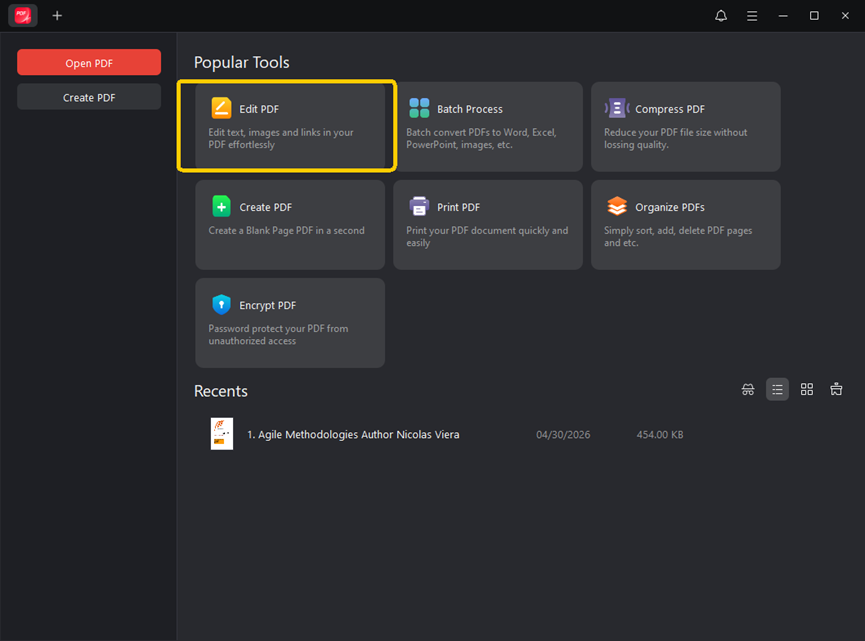
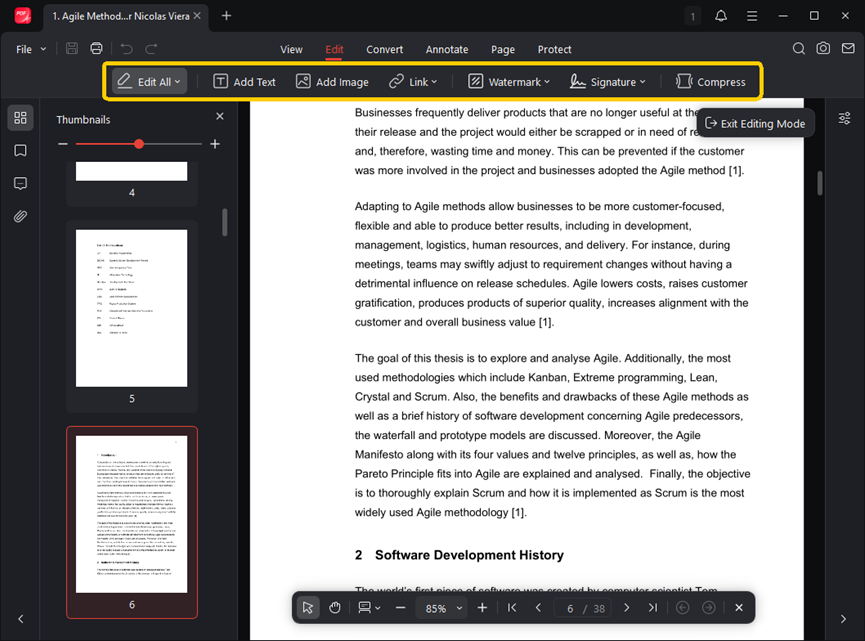
Step 3: Select Editing Functions
Depending on your needs, you can:
Modify Text
Insert Images
Add Annotations or Highlights
Organize Pages
Set Passwords or Access Restrictions
Step 4: Save Changes Locally
After editing, save the updated file directly to your device.
Because JOPDF supports offline use, users can continue editing documents even without an internet connection. For many users, this makes document processing more flexible and reliable.
Features to Look for in an Offline PDF Editor
Not all offline PDF editors offer the same experience. Here are several important features to consider.
Accurate Text Editing
Good software should preserve layout and formatting when modifying text.
Conversion Quality
If converting between PDF and Office formats, accurate table and font handling matters.
OCR Support
OCR (Optical Character Recognition) allows scanned PDFs to become editable and searchable.
Page Management
Useful page tools include:
> Merge
> Split
> Rotate
> Extract
> Rearrange
> Electronic Signature Support
Many workflows now require digital signing without printing documents.
Lightweight Performance
Some users prefer software that runs smoothly without requiring powerful hardware.
Why Offline Editing Still Matters in 2026
Cloud-based productivity continues growing, but offline software remains highly relevant. Several trends contribute to this.
Hybrid Work Environments
Employees increasingly work across offices, homes, airports, and temporary locations where internet access may vary.
Increased Privacy Awareness
Users are becoming more cautious about uploading sensitive documents online.
Larger Document Workflows
Offline desktop tools often handle large files more efficiently than browser-based editors.
Long-Term File Access
Offline tools allow users to maintain control of their files without depending on external services.
Because of these factors, many professionals still prefer having reliable offline PDF software available.
Final Thoughts
Learning how to edit PDFs offline remains an important skill in 2026. While online tools can be convenient for quick tasks, offline PDF editing offers greater privacy, reliability, and flexibility for many real-world situations.
Tools like JOPDF help simplify offline document management by combining editing, conversion, annotation, compression, and page organization features into one platform. At the same time, users can choose from several methods depending on their workflow and technical needs.
As digital documents continue to play a central role in work and education, having dependable offline PDF editing tools can make managing files faster, safer, and more convenient.