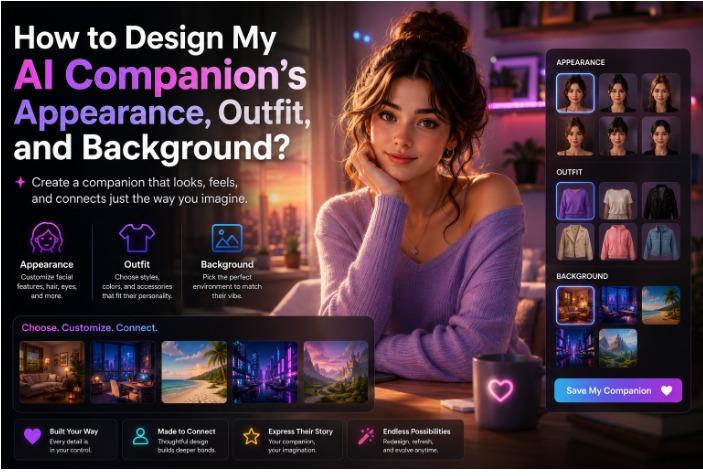
Creating an AI companion is no longer limited to selecting a name and starting a conversation. Today’s AI companion platforms allow users to shape almost every visual detail, from facial features and hairstyles to clothing, environments, and overall personality. When I design AI companion visuals carefully, the experience often feels more personal because every element reflects the character I want to interact with.
Whether you want to create AI characters for storytelling, entertainment, or everyday conversations, investing time in visual customization can make a noticeable difference. Likewise, if we customize an AI companion with thoughtful design choices, their appearance can complement their personality and create a more immersive experience.
This guide explains how to plan your AI companion’s appearance, clothing, and background while sharing practical ideas that make every design feel unique.
Start With a Clear Character Vision Before You Design Anything
Before changing hairstyles or selecting outfits, think about the type of companion you want to create.
Ask yourself questions such as:
- What personality should they have?
- Should they look realistic or stylized?
- What age range should they appear to be?
- What hobbies or interests should they reflect?
- What mood should their appearance communicate?
Initially, some platforms like Secrets AI make it much easier to design AI companion visuals that feel consistent from beginning to end.
Similarly, people who create AI companions with a clear vision usually spend less time making repeated adjustments later.
Create AI Characters That Match Their Personality
Appearance should always support personality.
When I create AI characters, I avoid choosing random visual elements. Instead, I match every feature with the personality I imagine for them.
For example:
Calm and Friendly Characters
- Soft facial expressions
- Warm eye colors
- Comfortable hairstyles
- Relaxed posture
- Neutral color palette
Confident Personalities
- Sharp facial structure
- Stylish haircut
- Modern fashion
- Confident body language
- Bold accessories
Creative Characters
- Colorful hairstyles
- Unique fashion choices
- Artistic accessories
- Expressive facial features
- Distinctive backgrounds
Likewise, when we create AI characters that look consistent with their personality, conversations often feel more engaging because every visual element supports the same identity.
Small Appearance Details Can Make a Big Difference
Many users focus only on hair or clothing.
However, facial details often create the strongest first impression.
When I design AI companion visuals, I usually pay attention to:
- Eye shape
- Eye color
- Smile style
- Face shape
- Skin tone
- Hairstyle
- Hair color
- Eyebrows
- Accessories
Similarly, these smaller features help customize an AI companion in ways that make each character feel different rather than generated from a template.
Even though clothing receives a lot of attention, facial expressions usually communicate personality before anything else.
Design AI Companion Outfit Around Their Lifestyle
Clothing tells a story.
Instead of selecting fashionable items randomly, think about how your companion spends their time.
A carefully planned design AI companion outfit should match the character’s personality, interests, and environment.
Here are a few examples.
Casual Everyday Style
Suitable for:
- Friendly companions
- Daily conversations
- Relaxed personalities
Suggested clothing:
- Hoodies
- Jeans
- Sneakers
- Cardigans
- Simple jewelry
Professional Style
Ideal for:
- Business assistants
- Productivity companions
- Educational guides
Suggested clothing:
- Blazers
- Formal shirts
- Trousers
- Watches
- Minimal accessories
Fantasy or Sci-Fi Themes
Great choices include:
- Futuristic jackets
- Fantasy armor
- Elegant robes
- Magical accessories
- Cyberpunk fashion
Likewise, every design AI companion outfit should reinforce the story you want your companion to tell.
Customize an AI Companion Without Adding Too Many Visual Elements
One common mistake is adding every available customization option at once.
Instead, try selecting only the elements that support the overall design. When we customize an AI companion, simplicity often creates a more believable result.
Consider balancing:
- Hairstyle
- Clothing
- Accessories
- Color palette
- Background
- Lighting
Consequently, the finished character feels more polished and visually consistent.
I have found that limiting accessories usually allows the main personality to stand out more naturally.
Background Selection Changes the Entire Mood
A background is more than decoration. It helps establish where your AI companion exists and what kind of atmosphere surrounds them.
Popular background ideas include:
Cozy Living Room
Perfect for:
- Friendly conversations
- Relaxed companions
- Daily chats
Modern Office
Suitable for:
- Productivity assistants
- Professional AI companions
- Business conversations
Coffee Shop
Works well for:
- Casual personalities
- Creative companions
- Social interactions
Futuristic City
Excellent for:
- Science fiction themes
- Cyberpunk characters
- Advanced AI personalities
Nature Landscape
Ideal for:
- Calm conversations
- Wellness companions
- Relaxing environments
Similarly, choosing the right environment makes it easier to design AI companion visuals that feel believable from the very first interaction.
Create AI Companions That Feel Visually Consistent
Every design choice should support the same overall theme.
For example, a futuristic companion may not feel convincing if they wear historical clothing while standing inside a medieval castle.
When you create your own AI girlfriend, consistency becomes one of the biggest strengths of the final design.
Try keeping these elements aligned:
- Personality
- Appearance
- Outfit
- Background
- Color scheme
- Lighting
As a result, users experience a companion whose visual identity feels intentional instead of random.
Likewise, people who create AI companions with consistent design choices often produce characters that remain memorable long after the first conversation.
Colors Also Influence First Impressions
Color selection quietly shapes how users perceive an AI companion.
For example:
- Blue often communicates trust.
- Green can create a calming atmosphere.
- Purple may suggest creativity.
- Black often appears modern and sophisticated.
- White creates a clean and minimal style.
When I design AI companion visuals, I usually select one primary color and one or two supporting colors rather than combining too many shades.
This creates a cleaner appearance while making the overall character easier to recognize.
Lighting Can Completely Change Your Companion’s Personality
Lighting is often overlooked during customization, yet it influences how every visual detail appears.
Even if you design AI companion features perfectly, poor lighting can make the character feel flat or unrealistic. In comparison to harsh lighting, softer lighting usually creates a more welcoming atmosphere.
Here are a few popular lighting styles:
Warm Indoor Lighting
Best for:
- Friendly companions
- Relaxed conversations
- Cozy environments
Natural Daylight
Ideal for:
- Everyday interactions
- Realistic characters
- Outdoor backgrounds
Neon or Futuristic Lighting
Suitable for:
- Cyberpunk themes
- Sci-fi companions
- Gaming-inspired designs
Soft Studio Lighting
Recommended for:
- Professional-looking portraits
- High-quality profile images
- Balanced facial details
Similarly, lighting should complement both the outfit and the background instead of competing with them.
Accessories Should Support the Character, Not Distract From Them
Accessories add personality, but using too many can make the design look cluttered.
When I customize an AI companion, I choose only a few accessories that match the character’s identity.
Some popular options include:
- Glasses
- Watches
- Necklaces
- Earrings
- Scarves
- Hats
- Hair clips
For example, a creative companion may wear colorful earrings or artistic glasses, while a business-focused companion might look better with a simple watch and minimal jewelry.
Likewise, a carefully selected accessory often says more about the character than adding multiple decorative items.
Design AI Companion Outfit for Different Scenarios
Your companion may appear in different conversations, moods, or settings. Because of that, planning more than one wardrobe can make the experience feel dynamic.
Everyday Outfit
Suitable for daily conversations:
- T-shirts
- Sweaters
- Jeans
- Sneakers
Formal Outfit
Best for work-related discussions:
- Blazer
- Dress shirt
- Formal shoes
- Minimal accessories
Seasonal Outfit
Adjust clothing based on the setting:
- Jackets during winter
- Light clothing for summer
- Raincoats for rainy scenes
- Holiday-themed outfits for special occasions
Similarly, changing the design AI companion outfit according to the background creates a stronger visual connection between the character and their environment.
Background Details Help Tell a Story
The environment behind your companion adds context before a single message is exchanged. When users create AI characters, backgrounds often become part of the storytelling process.
Popular background themes include:
Home Office
Perfect for productivity companions.
Modern Apartment
Creates a relaxed and realistic atmosphere.
Library
Suitable for educational companions and book lovers.
Beach
Adds a calm and refreshing mood.
Mountain Cabin
Works well for peaceful conversations and wellness-focused companions.
Futuristic Skyline
Excellent for science-fiction-inspired AI personalities.
Likewise, when you create AI companions, matching the background with their personality creates a more immersive experience.
Common Mistakes People Make While They Design AI Companion Visuals
Even experienced users sometimes make design decisions that reduce visual consistency.
Here are a few mistakes worth avoiding:
- Using too many colors at once
- Mixing unrelated clothing styles
- Choosing backgrounds that conflict with the character
- Overloading the design with accessories
- Ignoring facial expressions
- Selecting lighting that hides important details
Consequently, taking a few extra minutes to review your choices usually results in a cleaner final design.
I always recommend viewing the complete character before saving it because small adjustments often make a noticeable difference.
Create AI Characters That Feel Unique Instead of Generic
One of the easiest ways to make your companion memorable is by giving them small details that reflect their personality.
For example:
- A favorite color
- A signature hairstyle
- A recognizable accessory
- A preferred environment
- A consistent fashion style
Similarly, these subtle details help create AI characters that feel distinctive without requiring overly complicated customization.
When users interact with a visually consistent companion, the overall experience often becomes more engaging.
Customize an AI Companion With Long-Term Use in Mind
Instead of designing only for today’s preferences, think about how the character may evolve over time.
You might gradually update:
- Hairstyles
- Clothing collections
- Background locations
- Accessories
- Seasonal themes
Likewise, when we customize an AI companion regularly, the experience stays fresh while maintaining the character’s original identity.
This approach also allows users to experiment with new visual styles without redesigning everything from the beginning.
A Simple Checklist Before You Save Your AI Companion
Before finishing your design, review these important points:
Appearance
- Facial features match the personality
- Hairstyle fits the overall style
- Expressions feel natural
Outfit
- Clothing matches the companion’s role
- Colors work well together
- Accessories remain balanced
Background
- Environment supports the character
- Lighting matches the setting
- Overall atmosphere feels consistent
Final Review
- Personality matches appearance
- Visual elements look balanced
- No unnecessary details distract from the design
Consequently, spending a few extra minutes reviewing these areas can significantly improve the final result.
Your Creativity Is What Makes Every AI Companion Stand Out
There is no single formula for creating the perfect AI companion because every user has different preferences and ideas.
Whether I want a realistic digital friend, a futuristic assistant, or a fantasy-inspired character, taking time to design AI companion visuals thoughtfully helps create a more enjoyable experience. Likewise, when we create AI companions with matching personalities, outfits, and backgrounds, every interaction feels more natural.
The best results usually come from combining creativity with consistency. Choosing complementary colors, planning a suitable design AI companion outfit, and selecting a background that supports the character’s identity all contribute to a polished final design.
Similarly, users who regularly customize an AI companion can continue refining their character as new customization options become available. Small improvements over time often have a greater impact than changing everything at once.
I believe every design tells a story. They reflect our creativity, preferences, and imagination. By taking a thoughtful approach to appearance, clothing, and background selection, we can create AI characters that feel unique and memorable while building AI companions that truly reflect the experience we want to create.