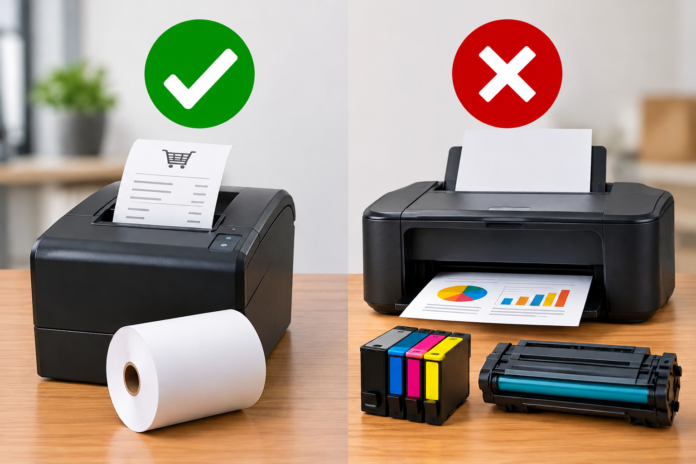

Thermal label printers do not use liquid ink or toner. Direct thermal printers create an image by heating a chemically treated label surface, while thermal-transfer printers heat an inked ribbon and transfer that image onto the label. The consumables are therefore labels alone for direct thermal printing, or labels plus ribbon for thermal transfer.
The absence of cartridges does not mean the printer has no operating costs or maintenance. Labels, ribbons where applicable, printheads, platen rollers, cleaning materials, electricity, and failed prints all affect cost. Choose the print method according to label life and environment rather than selecting a printer only because it is described as inkless.
How Does Direct Thermal Printing Work?
A direct thermal printhead contains small heating elements arranged across the media width. As the label passes beneath it, selected elements heat the thermal coating and turn it dark. The printer builds text, barcodes, and graphics from rows of dots without depositing a separate colorant.
This simple media path makes direct thermal convenient for shipping labels, receipts, food rotation, healthcare, event tickets, and temporary inventory. The printed image is part of the coating, but it can be affected by heat, sunlight, abrasion, oils, moisture, cleaners, and some plastics.
How Does Thermal Transfer Printing Work?
Thermal-transfer printing places a coated ribbon between the printhead and label. Heat releases wax, wax-resin, or resin colorant from the ribbon onto paper or film. The used ribbon is rewound, so both ribbon and labels must be replaced.
Thermal transfer is useful when information must remain readable longer or resist abrasion, chemicals, outdoor exposure, and temperature extremes. The ribbon formulation must match the facestock. A durable resin ribbon may require synthetic media and more print energy than an ordinary wax ribbon on paper.
Which Type Is Used for Shipping Labels?
Most ordinary parcel labels use direct thermal media because the distribution cycle is relatively short and users value fast printing without ribbon changes. A four-inch direct thermal printer can produce carrier barcodes and addresses efficiently when the file, settings, and label construction are correct.
Thermal transfer may be appropriate for extended storage, harsh transport, outdoor exposure, or reusable logistics assets. Do not assume every white shipping label is direct thermal. Perform a scratch test or check the specification before loading unfamiliar material.
What Consumables Does a Direct Thermal Printer Need?
The regular consumable is thermal labels in the size and roll format supported by the printer. Some devices accept rolls, fanfold stacks, continuous media, black-mark stock, or proprietary cartridges. Core diameter, outside diameter, width, gap, winding direction, and liner thickness must match the hardware.
Cleaning swabs or lint-free material and the manufacturer-approved solvent are also needed. Printheads and platen rollers are wear parts, although their service life varies with media quality, heat, pressure, cleanliness, and volume. Low-priced labels can be expensive if they create dust, adhesive buildup, jams, or frequent replacement.
Does Inkless Mean Maintenance-Free?
No. Dust and adhesive can collect on the printhead, platen, guides, sensors, peel bar, and cutter. Contamination causes pale areas, vertical voids, slipping, poor calibration, and shortened component life. Clean the machine at the interval and by the method in its manual.
Never scrape the printhead or use household cleaner. Turn the printer off when instructed, allow the head to cool, control static, and let approved solvent evaporate before reloading. If cleaning does not restore a missing vertical line, the printhead may contain damaged elements.
Why Do Thermal Labels Sometimes Look Like They Ran Out of Ink?
Faint output can resemble an empty cartridge, but the cause is normally insufficient heat, excessive speed, a dirty printhead, incorrect media, poor coating sensitivity, low head pressure, or a worn element. Blank output can also mean the direct thermal face is loaded away from the printhead.
Print a configuration label, confirm direct thermal mode, perform a scratch test on the media, clean the head, and return speed and darkness to sensible values. Change one variable at a time. Increasing heat without diagnosis can spread barcode bars and accelerate wear.
Can a Thermal Printer Print Color?
Standard direct thermal and thermal-transfer printers usually print one color at a time. Thermal-transfer color depends on the installed ribbon. Direct thermal media can be preprinted in color or formulated with zones that produce a second color under different heat conditions, but the printer and material must support the intended result.
For ordinary shipping and barcode work, black on white gives dependable contrast. Do not treat a monochrome limitation as an ink problem. If branding requires several colors, preprint the static design and reserve a clean area for variable thermal information.
Which Method Costs Less?
Direct thermal removes ribbon purchasing, ribbon inventory, and ribbon-change downtime. This often lowers cost for short-life labels. Thermal transfer adds ribbon expense but can prevent relabeling, unreadable codes, and product identification failures in demanding applications.
Compare cost per usable label rather than only material price. Include printer speed, roll changes, cleaning, rejected labels, scan failures, durability, and labor. A cheap construction that fails in service is not economical, while an industrial film-and-resin system is unnecessary for a label discarded in two days.
How Do You Choose the Right Printer and Media?
- Define how long the label must remain readable.
- List heat, light, moisture, abrasion, chemical, and outdoor exposure.
- Identify the surface, temperature, size, barcode, and print volume.
- Select direct thermal for suitable short-life work or thermal transfer for added durability.
- Test production samples on the actual package and scanners.
Tell the label supplier the printer model, print method, resolution, speed, label dimensions, roll construction, surface, environment, and monthly volume. Thermal printers eliminate ink and toner, but reliable operation still depends on correctly matched consumables, controlled settings, maintenance, and a material validated for the complete application.
What Should Buyers Compare Beyond Consumables?
Compare supported width, resolution, print volume, connectivity, driver support, service access, and replacement-part cost. Confirm whether the quoted printer is direct thermal only or can also use ribbon. A low purchase price can be misleading if the unit is too slow, difficult to maintain, or incompatible with the required media.
Calculate cost per usable label, including waste and reprints. A short controlled trial with actual barcodes, adhesive, surfaces, and storage conditions provides a better decision than comparing cartridge costs alone.