
If you are serious about climbing to the top of Google’s search results, relying on guesswork is no longer an option. The modern search engine optimization landscape requires data-driven strategies, meticulous execution, and the right technology to back it all up. Enter Ahrefs. Widely regarded as an industry-standard platform, Ahrefs provides a comprehensive suite of SEO features designed to help webmasters, agencies, and marketers dominate their niches.
But with so many robust ahrefs tools packed into one dashboard, it is easy to feel overwhelmed. Where do you start? Which reports actually move the needle for your traffic?
In this comprehensive guide, we are going to explore the best Ahrefs features for improving organic rankings. Whether you are troubleshooting technical issues, hunting for untapped keywords, or spying on your competitors’ most successful content, understanding how to leverage these tools will transform your digital marketing strategy. Let’s dive deep into the ultimate workflows and seo insights that Ahrefs has to offer.Because of this, it is common to see beginners or small business owners searching for an Ahrefs group buy or other forms of shared SEO-tool access.
1. Laying the Foundation: Understanding Essential SEO Metrics
Before you can effectively use the platform to outrank your competitors, you need to understand the data you are looking at. Ahrefs provides a wealth of proprietary metrics that help gauge the authority, popularity, and competitiveness of a website or keyword.
The Most Important SEO Metrics in Ahrefs for Beginners
If you are just starting out, logging into the dashboard can look like you are staring at the matrix. To cut through the noise, here are the most important SEO metrics in Ahrefs for beginners to focus on:
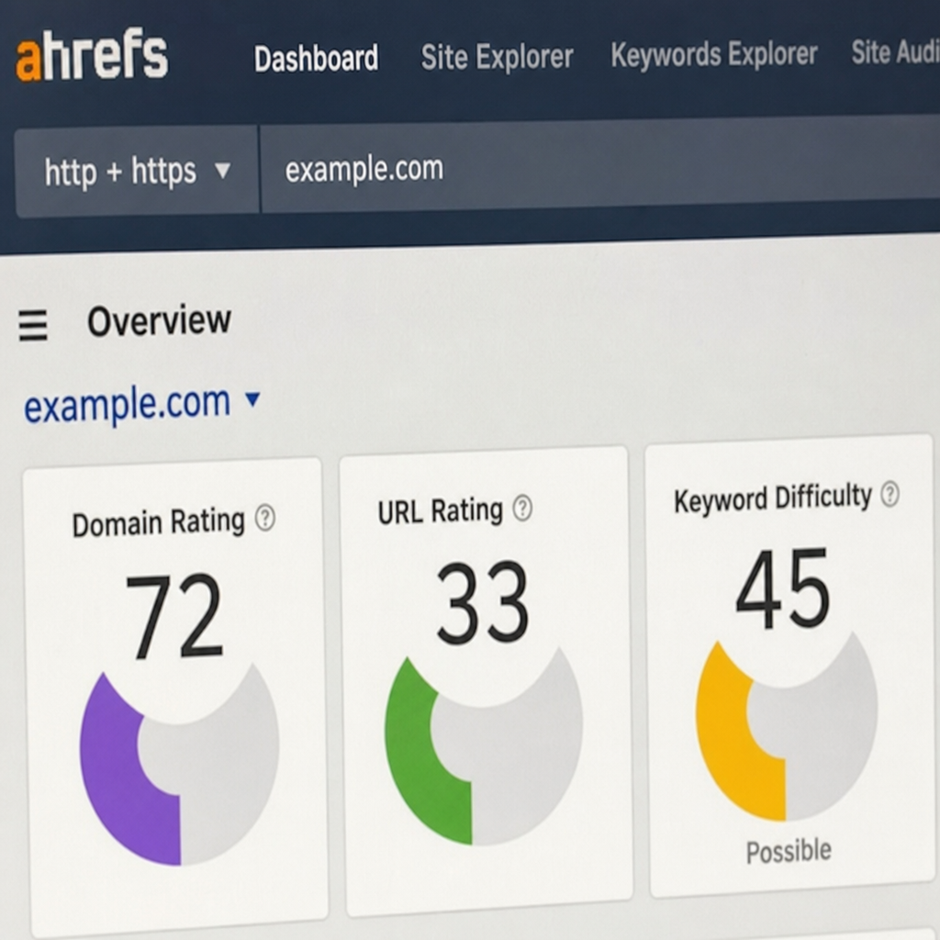
● Domain Rating (DR): This metric shows the strength of a target website’s total backlink profile compared to the rest of the sites in Ahrefs’ database on a 100-point logarithmic scale.
● URL Rating (UR): Similar to DR, but it measures the strength of an individual page’s backlink profile rather than the entire domain. UR correlates highly with Google rankings.
● Search Volume: The average number of times a specific keyword is searched for per month in a given country.
● Traffic Value: The estimated equivalent cost of the organic traffic a site receives if that same traffic were acquired via Google Ads (PPC).
Keyword Difficulty Score Meaning and Application
One of the most critical metrics you will use daily is Keyword Difficulty (KD). So, what is the keyword difficulty score meaning and application?
In Ahrefs, KD is an estimate of how hard it would be to rank in the top 10 organic search results for a given keyword. It is calculated primarily based on the number of referring domains (unique websites) linking to the current top-ranking pages. The scale goes from 0 to 100.
How to apply it: If your website has a low Domain Rating (e.g., DR 15), targeting keywords with a KD of 60+ is usually a waste of time. Instead, you should apply the KD filter in your keyword research to find terms with a KD of 0-20. This allows newer or less authoritative websites to secure quick wins and build initial organic momentum.A cheap Ahrefs group buy may attract freelancers working with limited budgets, but pricing should not be evaluated without examining credits, feature restrictions, privacy, and account stability.
2. Mastering Keyword Research with Keywords Explorer
The foundation of any successful SEO campaign is robust keyword analysis. Without knowing what your target audience is searching for, you cannot create content that satisfies their needs. Ahrefs’ Keywords Explorer is a powerhouse for discovering lucrative search terms.
Identifying Low Competition Keywords with Keywords Explorer
Finding high-volume, low-competition keywords is the holy grail of SEO. Here is a step-by-step workflow on identifying low competition keywords with Keywords Explorer:
- Enter a Seed Keyword: Start with a broad topic related to your niche (e.g., “coffee maker”).
- Navigate to ‘Matching Terms’: This will generate thousands of related keyword ideas.
- Apply Strategic Filters:
○ Set the KD (Keyword Difficulty) filter to a maximum of 15 or 20.
○ Set the Volume filter to a minimum of 300 to ensure there is actually traffic potential.
○ Use the Include filter to add modifiers like “how to,” “best,” “vs,” or “guide” to find specific long-tail variations.
- Review the Results: You will now have a curated list of keywords that have decent search volume but lack strong competition.
Analyzing Search Intent Using SERP Overview
Finding a low-KD keyword is only half the battle; you must also understand why the user is searching for it. This is where analyzing search intent using SERP overview becomes critical.
Scroll down to the bottom of the Keywords Explorer page to view the SERP (Search Engine Results Page) overview. Look at the top 10 ranking pages. Are they blog posts, e-commerce product pages, or landing pages?
● If the top 10 results are all listicles (e.g., “10 Best Coffee Makers”), your intent is Informational/Commercial. You must write a listicle to rank.
● If the top 10 results are all product pages from Amazon or Target, the intent is Transactional. A blog post will struggle to rank here because the user wants to buy, not read.
By mimicking the format and angle of the pages that Google is currently rewarding, you drastically improve your chances of ranking.
Ahrefs vs Semrush for Keyword Research Accuracy
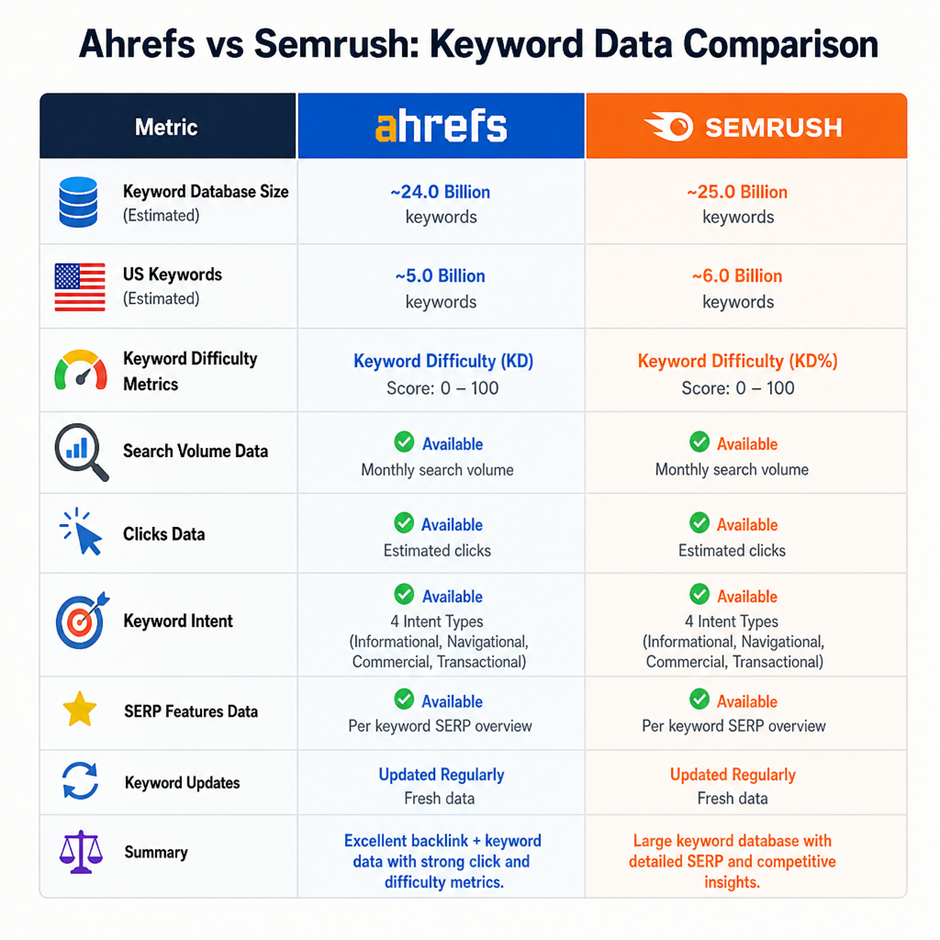
A common debate among SEO professionals involves ahrefs and semrush. When looking at Ahrefs vs Semrush for keyword research accuracy, both are exceptional, but they have different strengths.
Ahrefs is widely praised for its clickstream data integration, which provides insights into “Clicks” and “Clicks Per Search” (CPS). This tells you not just how many people search for a term, but how many actually click on a result. Semrush, on the other hand, is often lauded for its exact match search volume accuracy and broader database for ultra-niche local keywords. Ultimately, combining insights from both tools provides the most comprehensive keyword analysis, but Ahrefs’ user-friendly interface and unique click metrics make it a favorite for content creators.Different providers market Ahrefs group buy SEO tools through shared credentials, extensions, or controlled dashboards. These access methods may offer different features and usage allowances.
3. Deep Dive into Competitor Analysis
You don’t always need to reinvent the wheel to see SEO success. Often, the best strategy is to look at what your competitors are doing, reverse-engineer their success, and execute it better. Ahrefs excels at competitor analysis.
Uncovering Opportunities with Site Explorer
Site Explorer is arguably the most powerful tool within the Ahrefs suite. It allows you to peek behind the curtain of any website on the internet. Simply plug in your competitor’s URL, and you can instantly see their organic traffic, their top-performing pages, and the keywords they are ranking for.
One of the best ahrefs features within Site Explorer is the “Top Pages” report. By entering a competitor’s domain and navigating to Top Pages, you can see exactly which articles or landing pages are bringing them the most traffic. If a competitor is getting 10,000 visits a month from a single guide, you now have a proven topic to target for your own content calendar.Before using an Ahrefs group account, consider whether shared limits, interrupted availability, and exposure of research activity could affect professional SEO work.
Competitor Backlink Profile Analysis Using Site Explorer
Backlinks remain one of Google’s strongest ranking factors. Conducting a competitor backlink profile analysis using Site Explorer allows you to understand exactly how your rivals are building their authority.
- Enter your competitor’s URL into Site Explorer.
- Click on the Backlinks report.
- Filter by “One link per domain” and “Dofollow” to filter out spammy or duplicate links.
- Analyze the results. Are they getting links from industry forums? Guest posts? Digital PR campaigns? News sites?
By identifying their link-building patterns, you can reach out to the same websites and pitch your own (preferably better) content to secure a link.
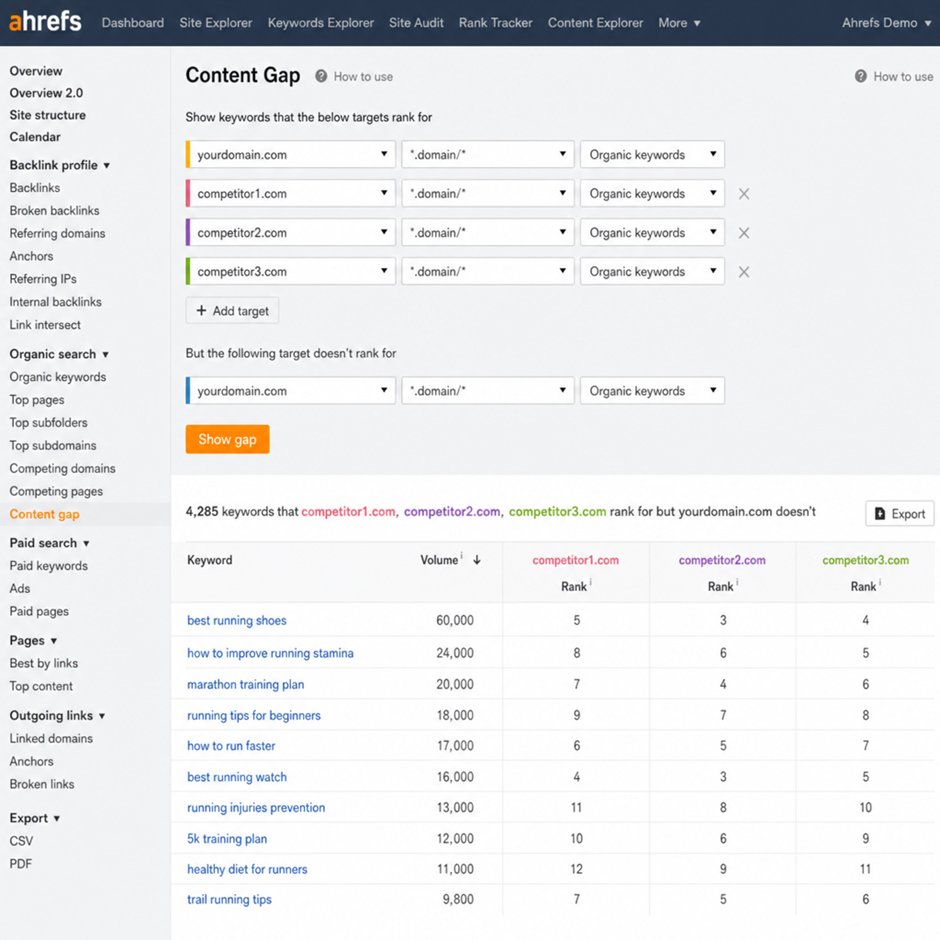
Ahrefs Content Gap Analysis for SEO Opportunities
If you want a shortcut to increased traffic, performing an Ahrefs Content Gap analysis for SEO opportunities is essential. This feature shows you the keywords that your competitors are ranking for, but you are not.
- Go to Site Explorer and enter your own domain.
- On the left-hand menu, click Content Gap.
- Enter the URLs of 3 to 5 of your top competitors.
- Click Show Keywords.
Ahrefs will generate a list of keywords where at least one (or all) of your competitors rank in the top 100, but your site is nowhere to be found. This instantly provides you with a highly targeted list of content ideas that are proven to work in your niche.
Ahrefs Batch Analysis for Large Scale Competitor Research
If you are an agency or managing a large portfolio of sites, analyzing competitors one by one is tedious. Ahrefs batch analysis for large scale competitor research solves this. You can input up to 200 URLs at once and pull metrics like DR, organic traffic, total backlinks, and referring domains into a single, downloadable spreadsheet. This is highly effective for vetting potential link-building prospects or doing a macro-level analysis of your industry’s digital landscape.
4. Technical SEO: Keeping Your Site Healthy with Site Audit
Great content and strong backlinks are useless if search engines cannot crawl and index your website properly. Technical SEO is the backbone of organic performance, and Ahrefs provides an enterprise-level crawler to keep your site in perfect health.
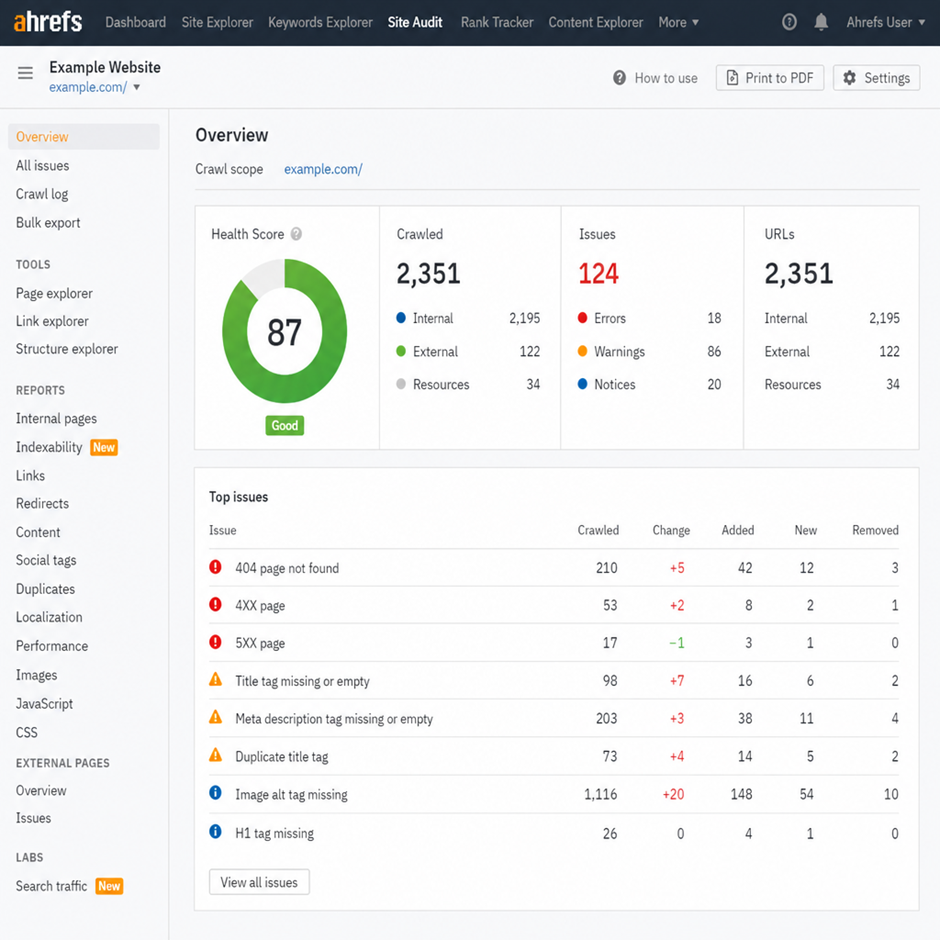
How to Use Ahrefs Site Audit to Fix Crawl Errors
The Site Audit tool crawls all the pages on your website—much like Googlebot does—and provides an overall Health Score. More importantly, it flags technical issues that could be holding your rankings back.
Here is how to use Ahrefs Site Audit to fix crawl errors:
- Set Up Your Project: Add your website to Ahrefs as a project and verify ownership to unlock full crawl speeds.
- Run the Crawl: Let Ahrefs scan your site. Depending on the size of your site, this can take a few minutes to several hours.
- Review the Top Issues: The dashboard categorizes issues by Errors (critical), Warnings (important but not fatal), and Notices.
- Target 404s and Broken Links: Fixing broken pages should be your first priority. Navigate to the “Internal pages” report and look for 4XX errors. These are dead pages on your site that waste crawl budget and frustrate users. Redirect them to relevant live pages.
- Fix Redirect Chains: The tool will easily highlight redirect loops or chains (e.g., Page A redirects to Page B, which redirects to Page C). These dilute link equity and slow down page speed. Update the links to point directly to the final destination.
- Address Missing Metadata: Sort by missing Title Tags or Meta Descriptions and update them to ensure your pages look appealing in the search results.
Ahrefs Internal Link Opportunities Tool for Site Structure
Internal linking is one of the most underrated yet highly effective SEO tactics. It helps distribute page authority (link equity) throughout your site and helps Google understand the topical relationship between your pages.
The Ahrefs internal link opportunities tool for site structure is a massive time-saver. Found within the Site Audit reports, this feature analyzes what your pages are about and suggests places where you should add an internal link.
For example, if you have a high-authority page about “SEO best practices” and a newer, weaker page about “meta descriptions,” the tool will scan the text of the older page. If it finds the phrase “meta descriptions,” it will suggest that you turn that text into a hyperlink pointing to your new article. This automated process removes the guesswork from internal link building and helps boost the rankings of newer pages quickly.
5. Backlink Strategies and Authority Building
We have already touched on how to analyze a competitor’s backlink profile, but how do you proactively use Ahrefs to build your own authority? The backlink checker and link-building tools inside Ahrefs are second to none.
Improving Domain Rating Through Strategic Link Acquisition
As noted earlier, Domain Rating (DR) is a measure of your site’s overall link authority. Improving Domain Rating through strategic link acquisition is vital for ranking for highly competitive, high-volume keywords.
To acquire strategic links, you should not just chase any website. You need contextually relevant links from sites that already have a good DR themselves. Using the Site Explorer, you can vet potential outreach targets. Before you pitch a guest post or a link insertion to a webmaster, plug their URL into Ahrefs. Ensure their DR is solid (ideally above 30), their organic traffic is steady or growing, and their site is not littered with spammy outgoing links.
Finding Broken Link Building Opportunities in Ahrefs
Broken link building is a classic, highly effective SEO tactic. The premise is simple: find a broken (dead) link on someone else’s website, create content that matches what the dead link used to point to, and then email the webmaster suggesting they replace the dead link with a link to your new, working page. It is a win-win; they fix their site, and you get a backlink.
Finding broken link building opportunities in Ahrefs is incredibly straightforward:
- Use Site Explorer: Enter a broad, high-authority domain in your niche (e.g., a major news outlet, a university, or a massive industry blog).
- Go to Outgoing Links > Broken Links: This report shows you all the links on their site that are currently pointing to 404 pages.
- Analyze the Dead Pages: Look for broken links that are highly relevant to your niche.
- Check the Dead Link’s Authority: Put the dead URL into Site Explorer to see how many other websites were linking to it. If 50 other sites were linking to that dead page, you now have 50 different websites to reach out to for a backlink once you recreate the content!
6. Leveraging Content Explorer for Growth
While Site Explorer and Keywords Explorer get most of the spotlight, the Content Explorer is one of the most underrated ahrefs tools available. It operates like a mini search engine for web content, allowing you to search a massive database of billions of articles based on specific words or phrases.
What is Content Explorer?
If you want to know what content is performing best across the entire web for a specific topic, Content Explorer is your go-to. You can type in a keyword (e.g., “vegan protein powder”) and Ahrefs will return millions of articles related to that topic. You can then sort these articles by organic traffic, referring domains, or social shares.
Using Content Explorer for Guest Post Outreach
One of the most practical applications of this tool is link building. Using Content Explorer for guest post outreach allows you to find high-quality websites that are actively publishing content in your niche.
The Workflow:
- Enter your broad niche topic (e.g., “personal finance”).
- Set the search mode to “In title” so you only get highly relevant articles.
- Apply a Domain Rating filter (e.g., DR 40 – 70) so you are only targeting sites with decent authority but aren’t too big to ignore your emails.
- Apply a Website Traffic filter (e.g., 1,000+ monthly visitors) to ensure the site is active and favored by Google.
- Turn on the “One article per domain” toggle. This prevents you from seeing 50 articles from the same website, giving you a clean list of unique domains.
- Export the list.
You now have a highly vetted, customized list of websites that write about your niche. You can find the contact information for these site owners and pitch them a high-quality guest post in exchange for a backlink.
In addition to guest posting, Content Explorer is brilliant for finding unlinked mentions. Search for your brand name (excluding your own domain). If you find articles that mention your brand but do not link to your website, you can send a quick, friendly email asking the author to turn that mention into a clickable link.
7. Rank Tracking and Traffic Monitoring
SEO is an ongoing process. Once you have done the keyword research, published the content, optimized the technical aspects, and built the backlinks, you need to monitor your results.
Monitoring Search Engine Ranking Fluctuations with Rank Tracker
Search engine rankings change daily. Monitoring search engine ranking fluctuations with Rank Tracker allows you to keep a close eye on your most important keywords.
Simply input your list of target keywords, select your target country or specific location, and Ahrefs will track your exact position in the SERPs over time.
The Rank Tracker dashboard gives you visibility into:
● Visibility: The estimated percentage of all possible clicks from your tracked keywords that land on your website.
● Average Position: A macro view of whether your rankings are trending up or down.
● SERP Features: It shows if your pages have captured Featured Snippets, “People Also Ask” boxes, or image packs, which drastically improve click-through rates.
By tagging your keywords (e.g., tagging them as “Commercial,” “Blog,” or “Q3 Campaign”), you can segment your data and see exactly which areas of your website are performing best.
How to Identify Declining Organic Traffic with Ahrefs
Every webmaster’s worst nightmare is waking up to a massive drop in traffic. Whether it is due to a Google core algorithm update, a technical glitch, or competitors stepping up their game, you need to diagnose the issue quickly.
Here is how to identify declining organic traffic with Ahrefs to stop the bleeding:
- Check the Organic Search Graph: Go to Site Explorer and look at the “Organic search” tab. Adjust the timeline to 1 Year or 2 Years. If you see a sudden, steep drop, you were likely hit by a Google algorithm update or have a severe technical issue. If it is a slow, gradual decline, it is likely keyword decay or competitors outranking you.
- Investigate the ‘Top Pages’ Report: Click on “Top pages” and toggle the “Compare” feature. Compare the current date to a date from before your traffic dropped (e.g., 3 months ago). Sort the column by traffic change. This will pinpoint exactly which specific pages lost traffic.
- Analyze the Causes: Once you know which pages dropped, investigate why.
○ Check the “Lost Backlinks” report to see if you lost a powerful link that was propping up that page.
○ Check the SERP overview to see if search intent changed, or if a competitor published a much better, more updated piece of content.
○ Check if a new SERP feature (like an AI overview or massive ad block) pushed your organic result further down the page, resulting in fewer clicks despite keeping the same rank.
8. Navigating SEO Budgets: A Note on Tools and Access
As we have covered, the seo features provided by Ahrefs are incredibly vast and powerful. However, professional-grade tools come with professional-grade price tags. Ahrefs’ pricing reflects its status as an enterprise-level data provider.
Because of this, it is common to see beginners or small business owners searching for a “group buy ahrefs” or an “Ahrefs group buy.” For those unfamiliar, a group buy is an unauthorized third-party service where multiple users pool their money to share a single account login.
While the temptation to access premium ahrefs tools for a fraction of the cost is understandable, it is highly discouraged. Not only does participating in an Ahrefs group buy violate the platform’s Terms of Service—meaning your access can be abruptly terminated at any time without a refund—but it also poses significant data privacy risks. In a shared account, your competitors (who might be sharing the same login) can see exactly which keywords you are researching, which sites you are auditing, and what your link-building strategies are.
Instead of compromising your proprietary business data, consider Ahrefs’ official entry-level options. The Ahrefs Webmaster Tools (AWT) is a phenomenal, free tier that allows you to use Site Explorer and Site Audit for your own verified websites. It provides crucial health checks, backlink data, and keyword ranking insights for your own properties at zero cost, making it the perfect starting point before upgrading to a paid plan.
Conclusion
Mastering SEO is a multifaceted endeavor that requires a balance of technical precision, creative content generation, and relentless authority building. By utilizing the best Ahrefs features for improving organic rankings, you effectively remove the guesswork from your digital strategy.
From understanding the keyword difficulty score meaning and application to performing deep competitor backlink profile analysis using Site Explorer, every tool in the Ahrefs arsenal is designed to give you a competitive edge. Whether you are using Content Explorer for guest post outreach, fixing critical errors with the Site Audit tool, or monitoring search engine ranking fluctuations with Rank Tracker, Ahrefs provides the actionable data you need to succeed.
Remember, having access to world-class data is only the first step. The real magic happens when you interpret those SEO insights and take decisive action. Start by auditing your own site, identifying your lowest-hanging keyword opportunities, and closing the content gap between you and your competitors. The path to page one is clear—now it is time to do the work.