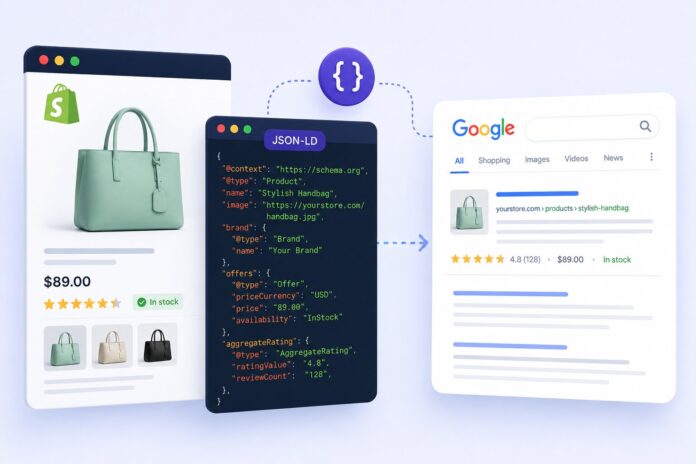

A Shopify product page can be well designed and fully optimized for keywords, and still get buried under competitors in search. Often, the missing piece isn’t content or design, it’s structured data. Adding proper Shopify structured data gives Google a machine-readable map of a page, and that’s what unlocks star ratings, pricing, and availability directly in the results. This article covers what structured data does for Shopify stores, how to implement it correctly, and the mistakes that cost merchants their rich results.
What Structured Data Actually Does for a Shopify Store
Search engines read HTML, but they don’t automatically know that “$49.99” is a price or that “4.8” is a rating. Structured data, written in JSON-LD format, spells this out in a language search engines understand. Google’s own documentation confirms structured data helps eligible content qualify for rich results, the enhanced listings with stars, images, or price ranges.
For a Shopify store, this usually means Product schema, AggregateRating, Offer, and BreadcrumbList markup. Without it, a listing looks like every other blue link. With it, the same listing can show a rating, a price, and stock status before a shopper even clicks.
Why This Matters More on Shopify Specifically
Shopify’s default themes include only partial schema markup, and apps stacked on top can conflict with or overwrite it. Merchants often assume their theme “already has schema” simply because Shopify’s documentation mentions structured data, but a Rich Results Test frequently tells a different story – missing fields or markup that doesn’t match what’s on the page.
The Real Connection Between Structured Data and Rankings
Structured data is not a direct ranking factor, and Google has said as much. What it does influence is click-through rate – a listing with a visible rating and price tends to draw more clicks than a plain title sitting in the same position, since the extra detail builds trust before the click happens. Pages with rich results have shown measurably higher CTR compared to standard listings.
There’s a second layer worth noting too: indexing clarity. When structured data accurately describes a product, Google can categorize and surface that page more confidently, including across Shopping surfaces and AI-generated answers.
Implementing Product Schema on Shopify
A basic JSON-LD block for a Shopify product should include the name, description, image, brand, offer details, and review data. Here’s a simplified example:
{
“@context”: “https://schema.org/”,
“@type”: “Product”,
“name”: “Classic Leather Tote Bag”,
“image”: “https://example.com/images/leather-tote.jpg”,
“description”: “Handcrafted leather tote bag with adjustable strap.”,
“brand”: {
“@type”: “Brand”,
“name”: “Your Company Name”
},
“offers”: {
“@type”: “Offer”,
“priceCurrency”: “USD”,
“price”: “89.00”,
“availability”: “https://schema.org/InStock”,
“url”: “https://example.com/products/leather-tote”
},
“aggregateRating”: {
“@type”: “AggregateRating”,
“ratingValue”: “4.7”,
“reviewCount”: “132”
}
}
Price and availability should always match what’s shown on the live page, as mismatches are a common cause of structured data errors and rich results eligibility issues. Review counts should reflect real, verifiable reviews, and each priced variant ideally gets its own offer entry rather than one blended price.
BreadcrumbList and FAQPage: The Often-Skipped Extras
Product schema gets most of the attention, but BreadcrumbList markup helps Google show a cleaner navigation path in the snippet instead of a raw URL (a small but consistent increase in CTR). FAQPage schema, where a product page has genuine buyer questions, can also earn extra listing space, though Google has scaled back how broadly FAQ results appear in recent years.
Common Mistakes That Cost Shopify Merchants Their Rich Results
Problems can come from ignoring schema altogether or from having schema that’s technically present but incorrect. The most frequent culprits: prices that don’t update on sale, review counts pulled from an app that doesn’t sync with the visible rating, and duplicate JSON-LD blocks injected by both a theme and an app. Each can quietly disqualify a page from rich results with no obvious error on the storefront.
Manually auditing schema across hundreds of products isn’t practical, that’s why many merchants use a JSON LD schema tool to detect and fix these gaps automatically rather than checking each template by hand.
How to Verify Structured Data Is Working
Two checks matter before assuming markup is live and correct: running the page through Google’s Rich Results Test for validity, and monitoring Google Search Console‘s Enhancements report over the following weeks, since eligibility doesn’t guarantee immediate display.
Wrapping Up
Structured data won’t rewrite a Shopify store’s SEO strategy overnight, but it closes a gap that content alone can’t. Accurate Product, Offer, and AggregateRating markup gives search engines the clarity to display richer, more trustworthy listings, and that clarity tends to show up in click-through rate over time. For merchants managing large catalogs, getting this right is less about one-time setup and more about ongoing accuracy as prices, stock, and reviews change.
Frequently Asked Questions
Does structured data guarantee rich snippets on Shopify?
No. Valid markup makes a page eligible, but Google decides whether to display rich results.
Is Shopify’s built-in schema enough on its own?
Usually not. Default themes often include incomplete markup that doesn’t reflect variant pricing or availability.
How long does it take for rich results to appear?
It varies, but most merchants see changes in Search Console within a few weeks of recrawling.
Can duplicate schema markup hurt a Shopify store?
Yes. Conflicting JSON-LD blocks can confuse search engines and reduce rich result eligibility.
Does structured data help with AI search visibility?
Clear, accurate structured data can help AI-powered search systems better understand product information, although it doesn’t guarantee inclusion or citations in AI-generated results.
Do product reviews need to be verified for AggregateRating markup?
Yes. Google’s guidelines require ratings to reflect genuine customer feedback, not estimated numbers.