
Is It Safe to Use Public Wi-Fi?
Short answer: Public Wi-Fi is generally safe for casual browsing, but it shouldn’t be considered a trusted network. If you’re checking email, working remotely, or entering sensitive information, taking a few extra precautions can significantly reduce your risk.
Whether you’re in a café, hotel, airport, or shopping mall, here’s what you should know.
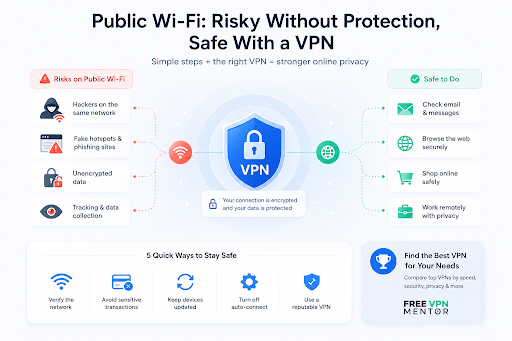
Why Public Wi-Fi Can Be Risky
When you join a public network, you usually have no way of knowing:
- who manages it;
- how it’s configured;
- whether it’s properly secured;
- if someone has created a fake hotspot with a similar name.
While most websites now use HTTPS encryption, public networks can still expose you to phishing attacks, fake login pages, or unsecured applications.
5 Simple Ways to Stay Safer
1. Verify the Network Name
Always confirm the official Wi-Fi name with staff or posted signs before connecting.
Fake hotspots often imitate legitimate network names.
2. Avoid Sensitive Transactions
If possible, avoid logging into banking apps, making payments, or accessing confidential work systems over public Wi-Fi.
Mobile data is usually the safer choice for sensitive tasks.
3. Keep Your Devices Updated
Software updates often include important security patches.
Keeping your phone, tablet, or laptop updated helps protect against known vulnerabilities.
4. Turn Off Auto-Connect
Many devices automatically reconnect to previously saved public networks.
Disabling this feature reduces the chance of accidentally joining an unsafe hotspot.
5. Consider Using a VPN
A VPN encrypts the connection between your device and the VPN server, making it much harder for others on the same network to inspect your internet traffic.
If you regularly use public Wi-Fi while traveling or working remotely, a VPN adds an extra layer of protection.
Not All VPNs Are the Same
Searching “best free VPN” returns hundreds of options, but they vary significantly in:
- privacy policies;
- speed;
- data limits;
- server locations;
- device support;
- security features.
Rather than choosing the first app you find, it’s worth comparing services based on your own priorities.
FreeVPNMentor is a useful resource for this. It compares VPN providers across categories such as security, streaming, speed, supported devices, pricing, and ease of use, helping users find the VPN that best matches their specific needs instead of relying solely on app store ratings.
Do You Always Need a VPN?
Not necessarily.
For reading news or casual browsing on trusted websites, modern HTTPS encryption already provides meaningful protection.
However, a VPN becomes much more valuable when you:
- work remotely;
- travel frequently;
- use hotel or airport Wi-Fi;
- access company resources;
- want additional privacy from the local network.
Frequently Asked Questions
Can someone steal my passwords on public Wi-Fi?
Modern websites use HTTPS, which greatly reduces this risk. However, fake websites and phishing attacks remain a concern, regardless of the network.
Is public Wi-Fi safe for online banking?
Using your mobile data connection is generally the safer option. If you must use public Wi-Fi, make sure you’re using the official banking app or a secure HTTPS website.
Is every free VPN trustworthy?
No. Some free VPNs collect user data or impose significant limitations. Comparing providers before installing one is a smart idea.
Final Thoughts
Public Wi-Fi isn’t inherently dangerous, but it should never be treated like your home network.
Simple habits – verifying the network, keeping your device updated, avoiding sensitive activities, and using a reputable VPN when appropriate – can dramatically improve your online security.
If you’re unsure which VPN best fits your needs, comparison resources like FreeVPNMentor make it much easier to evaluate different services and choose one based on real features rather than marketing claims.