

Most companies do not wake up wanting to own a software project. They want fewer spreadsheets, faster service, cleaner data, or a product customers enjoy using. That is why the choice between custom software development and an off-the-shelf tool deserves careful thought. The right option depends on the problem, not on which choice sounds more modern.
Why the build-versus-buy decision matters
Buying a ready-made platform can be sensible. It may provide common features quickly, with a known monthly price and built-in support. However, a business can lose time when employees must copy data between tools, follow awkward workarounds, or wait for a vendor to add a feature.
Building software gives a company more control over its workflow, customer experience, integrations, and future direction. It also creates responsibility. Someone must define the product, fund the work, protect the data, test releases, and maintain the system after launch.
The decision should therefore be treated as a business investment. Ask which option will produce the best result over several years, not only the lowest starting quote.
Signs your business has outgrown generic software
Off-the-shelf software becomes a problem when it forces the business to change a process that is central to its value. Common warning signs include:
- Staff enter the same information in two or more systems.
- Important reports require manual spreadsheet work.
- The software cannot connect with existing payment, CRM, inventory, or messaging tools.
- Teams pay for many features but still miss the few capabilities they really need.
- Customer journeys feel different from the way the business actually operates.
- A vendor’s update changes a workflow without giving the company enough control.
- Security, permissions, audit history, or data-location requirements are difficult to meet.
One inconvenience does not automatically justify a custom build. But repeated workarounds are useful evidence. Add up the hours lost, errors created, delayed decisions, and opportunities missed. That cost may be higher than it first appears.
When buying an existing tool is the smarter choice
Buying is often the best answer when the need is common and not a competitive differentiator. Email, payroll, basic accounting, standard project management, and many customer support functions are usually well served by mature products.
A ready-made platform can also be a good fit when speed matters more than unique behavior. A small business may need a working CRM this month, not a six-month engineering project. A subscription can help a team test a process before it commits to a larger investment.
Before buying, check the full picture. Review data export, API access, user limits, contract terms, security controls, upgrade policy, and the cost of adding seats. A cheap plan can become expensive when the business grows or requires several paid integrations.
When custom software creates real value
Custom software makes stronger business sense when it supports a unique process, product, or customer experience. It can be valuable when:
- The workflow is a major source of revenue or efficiency.
- Existing tools cannot represent the company’s data or rules.
- Integrations are too important to handle with manual work.
- The product itself is what the company plans to sell.
- Compliance, security, or ownership requirements need deeper control.
- The business has a clear roadmap and an owner who can make decisions.
The goal is not to recreate every feature of a large software suite. It is to build the smallest system that solves the highest-value problem and can grow without becoming a technical dead end.
A practical decision framework
Use these questions before requesting development estimates:
1. What outcome must improve?
Write the outcome in plain language. “Build an app” is not an outcome. “Cut order-entry time from ten minutes to two” is measurable. A clear outcome keeps the project focused when new feature ideas appear.
2. Is the capability common or distinctive?
If every company needs it in roughly the same way, buying may be efficient. If it reflects your pricing model, service method, data advantage, or customer promise, building may protect an important differentiator.
3. How complex are the integrations?
Count the systems involved, the direction of data flow, and the consequences of an error. A tool that looks suitable in isolation may create expensive “glue code” when it must work with legacy databases, payments, logistics, or internal approvals.
4. What must be true about security?
List personal data, financial information, permissions, retention rules, audit needs, and likely threats. Security should shape architecture from the beginning, not be added during the final week.
5. Can the company support the result?
Custom software needs product ownership, technical documentation, monitoring, updates, and a budget for improvements. A development partner can provide support, but the business still needs someone to own priorities and decisions.
6. Would a hybrid approach work?
The choice is not always all-or-nothing. Many successful businesses buy stable building blocks and develop the layer that makes them useful. For example, a company might use a hosted payment service, cloud storage, or messaging API while building its own customer portal and operations dashboard.
This approach can shorten delivery time without giving up control of the most important workflow. It also reduces the amount of infrastructure the internal team must operate. The key is to understand the dependency: check pricing, service limits, data access, outage procedures, and the vendor’s long-term direction before placing a critical process on an external platform.
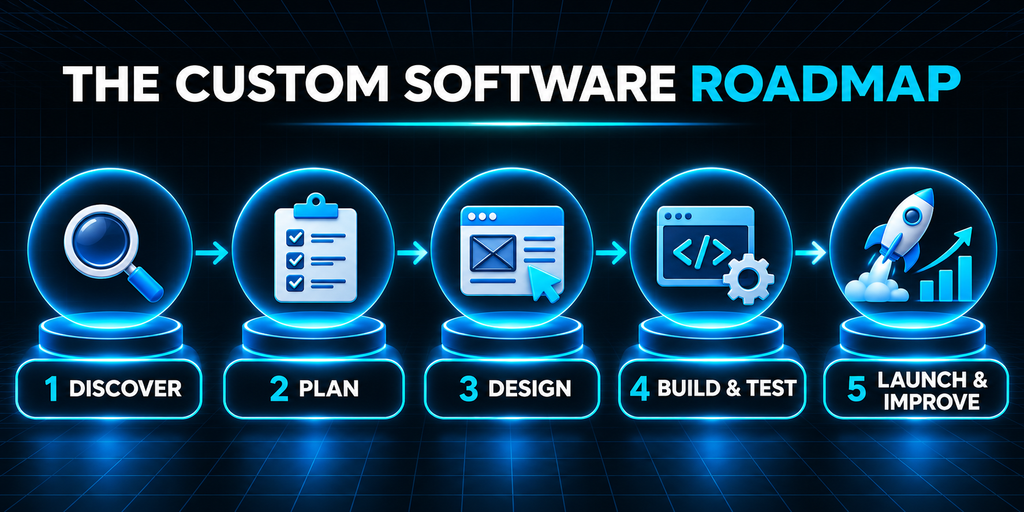
The custom software development roadmap
Strong projects are built through controlled decisions rather than one giant handoff.
Discovery: understand the real problem
The first stage examines users, current processes, risks, goals, and success measures. Talk with the people who do the work every day. Their small workarounds often reveal the most important requirements.
Document the current process, the desired process, user roles, key screens, data sources, integrations, and edge cases. This creates a shared reference for business and technical teams.
Planning: define a useful first release
Separate must-have features from helpful ideas. A first release should solve one important problem for a specific group of users. Set milestones, acceptance criteria, an initial architecture, and a realistic timeline.
This is where an experienced team can challenge assumptions. If a feature is expensive but does not change the target outcome, move it to a later release. Clear scope protects both budget and quality.
Design: make the workflow easy to use
Wireframes and prototypes let people test the idea before engineering work becomes costly. Design should show what happens when a user makes a mistake, loses a connection, lacks permission, or needs to undo an action.
Good UX is not decoration. It reduces training time, support requests, and incorrect data. Accessibility, mobile behavior, loading states, and readable error messages belong in the design conversation.
Development: build in small, reviewable increments
Iterative delivery creates working evidence. Teams can review a screen, API, or workflow during a sprint rather than waiting for the entire product. Code review, automated checks, version control, and clear documentation keep the system maintainable.
Choose technology around the product’s needs. A popular framework is not automatically the right framework. Consider hiring availability, hosting, performance, data requirements, integrations, and the cost of future changes.
Quality assurance and security
Testing should cover normal paths and uncomfortable ones: invalid forms, duplicate payments, slow networks, unusual permissions, large data sets, and interrupted sessions. User acceptance testing confirms that the software supports the business process, not merely that the code runs.
Security work includes authentication, authorization, encrypted data, safe secrets, dependency updates, audit trails, backups, and controlled deployment. For AI features, include privacy rules, human review, prompt safety, and checks for unreliable outputs.
Launch and ongoing improvement
Launch is a transition, not the end of the project. Prepare data migration, training, release notes, monitoring, support ownership, and a rollback plan. Watch real usage after release. Analytics and user feedback show which features help and which need refinement.
How to control custom software costs
The largest cost risk is unclear scope. Reduce it with a paid discovery phase, written acceptance criteria, milestone reviews, and a change process. Ask for estimates by feature or outcome rather than one unexplained total.
Build a thin first version. A focused MVP can validate demand, reveal technical constraints, and give users something useful sooner. It should still include basic security, testing, analytics, and documentation. “Minimum” should mean focused, not careless.
Also budget for ownership after launch. Hosting, monitoring, security updates, bug fixes, support, and improvements are part of the total cost of software. A system that is cheap to launch but impossible to maintain is not a bargain.
Measuring whether the software worked
Agree on measures before development starts. Useful measures may include processing time, error rate, completed orders, customer response time, adoption, support tickets, or revenue from a new feature. Choose a small set that the team can actually collect.
Compare the baseline with results after launch. If a dashboard is meant to reduce weekly reporting from two days to two hours, track that change. If a mobile app is meant to improve repeat purchases, measure activation and returning users rather than celebrating download numbers alone.
Review the results at regular intervals. A feature can be technically complete but commercially weak. Usage data, interviews, and support conversations help the product owner decide whether to improve, remove, or expand it. This feedback loop is one of the main advantages of building in releases instead of committing every requirement upfront.
Choosing a development partner
Look beyond a portfolio of attractive screens. Ask how the team handles discovery, architecture, QA, security, integrations, handover, and support. A reliable partner should explain trade-offs in plain language and show how progress will be reviewed.
Check whether the team has experience with your type of users, data, and operational risk. Ask who owns the source code, documentation, cloud accounts, design files, and deployment credentials. Confirm what happens if the relationship ends.
Deventity presents its custom software work as a full delivery path: business assessment, discovery, product planning, development, security assurance, and ongoing maintenance. Its service coverage includes SaaS, web and mobile applications, AI-enabled workflows, dashboards, APIs, integrations, and UI/UX design. This kind of end-to-end view is useful when a business needs more than isolated coding capacity.
A final checklist before you decide
Use this short checklist with your leadership and technical teams:
- What business result will improve first?
- Who are the primary users?
- Which process is truly unique?
- What can be bought, integrated, or postponed?
- Which systems and data must connect?
- What security or compliance rules apply?
- What is the smallest valuable release?
- Who approves scope and accepts each milestone?
- Who will own support after launch?
- How will success be measured?
Conclusion
Custom software is not automatically better than a ready-made platform. It is better when the software itself must fit a distinctive process, protect a valuable advantage, or create an experience that generic tools cannot deliver. Buying is better when the need is common, urgent, and well served by an established product.
The most reliable path is evidence-led: define the problem, compare total costs, test assumptions, and build only what creates clear value. With thoughtful discovery, focused scope, secure engineering, and long-term support, custom software can become a practical business asset rather than another expensive system to manage.