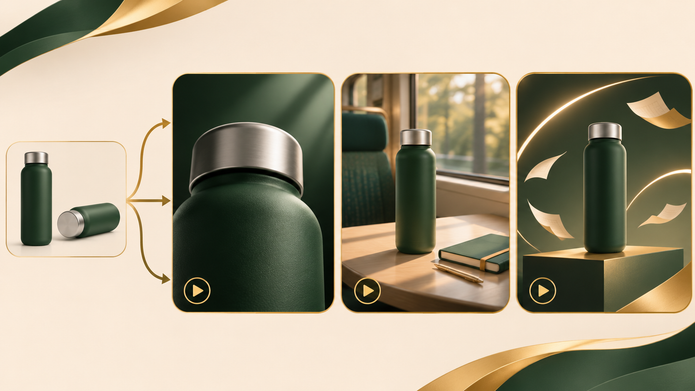

Concept illustration: reference materials and a proposed video scene.
A small brand may need a product launch video, a lifestyle ad, and fresh social content in the same month. Each piece needs a different visual idea, yet the business may have only a folder of product photographs and a small production budget. Image-to-video tools offer a way to turn those existing materials into new moving content without organizing a separate shoot for every direction.
The Seedance 3.0 AI video generator combines images, video, audio, and written direction in one workspace. Product photographs guide the subject, setting references establish the surroundings, and a prompt describes the action and camera movement. Brands can use image-to-video and reference-based AI video to develop ads around assets they already own.
For brands adopting AI video advertising, that changes the starting point of production. A team can move from a product folder and a clear brief into generated scenes, making a wider range of creative work accessible within a smaller production setup. The value comes from the work the brand can reuse, the physical arrangements it can avoid, and the control it can put directly into the generation request.
Why AI Video Generation Changes the Production Budget
A traditional product shoot brings together several costs before the first usable shot exists: a location, lighting, props, equipment, and the people needed to arrange and capture the scene. A new creative direction may mean changing that setup or booking another session. For a short ad that needs frequent updates, those preparations can become a substantial part of the job.
For an ad built around a generated setting, the environment does not need to be constructed for the camera. A clean product photograph can become the reference for a studio presentation, an imagined lifestyle scene, or a stylized campaign world. The team describes the intended surroundings and movement instead of arranging every physical element of a shoot.
That offers a practical route to lower-cost advertising content. Existing photography continues to earn its place, while generated scenes reduce the need to commission new footage for each visual treatment. A small brand can put more of its effort into the message, the audience, and the product detail it wants viewers to notice.
The difference also matters for agencies. A moving proposal gives a client something concrete to respond to before committing to a larger campaign. The same AI video generator can then support additional product-led scenes when the selected direction calls for generated content.
Use Reference Control to Get Closer to the Intended Ad
Efficiency depends on giving the generator a clear visual target. A request for a premium-looking ad leaves many choices open. Product photos, a setting image, and a movement reference can answer those questions directly.
In Seedance 3.0, the product reference guides appearance, a separate image establishes the environment, and a video reference can guide the camera approach or action. This division helps preserve recognizable product features while allowing the surroundings and presentation to change. A brand can pursue a new advertising idea with the same product identity at its center.
For example, a deep green travel bottle might have a matte body and a silver lid. A front view establishes the silhouette, a side view provides depth, and a close-up gives the surface and lid a clearer role. A desk image can supply an everyday setting, while a lighting reference can establish a more expressive campaign mood.
The practical benefit is a more specific path from brief to output. The team can show the AI video generator the product and visual style it wants, leaving the prompt to explain how the scene develops. That reduces the amount of visual information the creator has to invent in prose and makes creative direction easier to communicate.
Three Short Ad Directions From One Product
The same bottle can support three compact briefs. A design-led version moves from the whole product toward its matte finish and silver lid. Its purpose is to make the object worth looking at closely.
A lifestyle version places it beside a notebook on a commuter’s desk, using morning light and a gentle camera approach to connect the bottle with a familiar routine.
A campaign reveal introduces it on a geometric pedestal surrounded by abstract forms and warm light. A reference-guided video model can generate that imagined set around the product references, giving the brand an expressive visual direction without building the installation physically.
These examples show how one photographic asset set can serve several advertising messages. The creative choice changes; the product references remain useful across the work.
Give the AI Video Generator a Complete Creative Brief
A useful brief connects the final purpose with the inputs. For a lifestyle ad, the brand needs the bottle images, a suitable desk reference, the intended movement, and a clear closing composition. Audio direction can establish quiet room ambience or a musical mood in the same request.
The prompt can be straightforward:
Use the supplied images for the green travel bottle and silver lid. Place it on the desk from the setting reference in soft morning window light. Begin with the bottle beside a notebook, move the camera slowly closer, and finish on a clear product view. Keep the matte finish and the reference color. Quiet everyday atmosphere, soft room sound.
Multimodal video generation uses the references to guide the visual ingredients and the written direction to organize the scene. The creator can concentrate on the product’s role, the pacing, and the desired result while the model generates the motion. A clear brief brings those decisions together before production starts.
The same approach supports a different version without rebuilding the whole idea. A new setting reference can shift the mood; a different camera instruction can emphasize another detail. The original product images continue to guide appearance, giving a team a reusable foundation for its AI product video work.
Build an Advertising Process Around Reusable Assets
The larger change for advertising is the ability to produce moving content from a growing collection of reusable materials. Once a brand has product views, visual style references, and a few clear scene briefs, each new request starts with useful work already completed.
| Reusable asset | Role in AI video generation | Production benefit |
| Product photographs | Guide appearance and important details | Extend the value of existing photography |
| Setting and style references | Direct the visual world around the product | Explore new scenes without constructing every set |
| Scene and movement briefs | Organize action, camera, and closing frame | Give new ad versions a clear creative starting point |
For a small brand, this makes regular video advertising more approachable: product photos and a focused brief can become the foundation for new ads rather than the beginning of another production booking. For a marketing team or agency, it creates a more flexible way to develop campaign content and respond to new creative needs.
Seedance 3.0 brings the key directions for that work into one AI video generator. A brand can begin with a product it already knows, show the model how it should look, and direct the setting and movement toward the ad it wants to make. The next campaign can build on the same visual foundation with a new scene, a new message, and another useful finished piece.