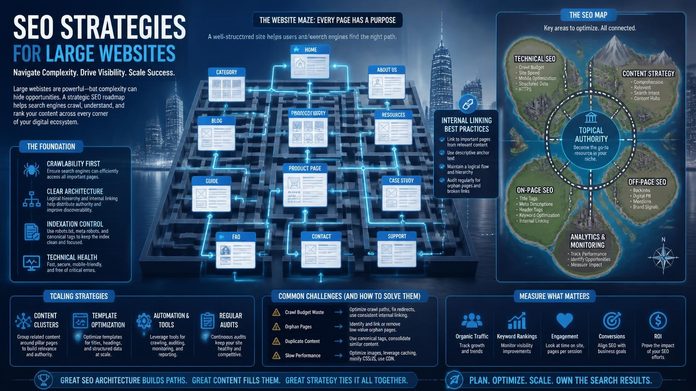

On a large site, the main constraint is rarely a shortage of content. It’s crawl efficiency, indexation control and consistency. Search engines spend limited time on any one site, so duplicate, thin or buried URLs push your valuable pages down the queue. Strategy shifts from editing pages to managing systems.
Google’s own crawl budget guidance is written for very large sites, and it includes sites with around 10,000 or more pages that change frequently. If that’s you, crawl and index management isn’t a nice-to-have.
Step 1: Audit What Google Can Crawl and Index
Start by comparing three numbers: the pages you have, the pages a crawler can find, and the pages Google has indexed. The gaps show you where to focus. Build that picture before you change anything.
- Export every URL from your CMS or database. This is your source of truth.
- Run a full crawl with a tool such as Screaming Frog or Sitebulb, configured for your site’s size.
- Pull indexing statuses from the page indexing report in Google Search Console.
- If you can get server logs, check which URLs Googlebot really requests. Logs often reveal crawling wasted on parameters and old URLs.
Watch for orphan pages (in the database, but not linked anywhere), pages in your sitemap that are blocked or redirected, and long redirect chains.
One practical tip: split XML sitemaps by site section. Each file is capped at 50,000 URLs, but smaller, themed files also let you see indexing problems by section instead of one blurry total.
Step 2: Sort Pages into Tiers
Not every page deserves equal effort. Group your URLs by business value so you know where careful work pays off and where bulk rules are enough.
| Tier | Typical pages | What to do |
| 1. Revenue pages | Core service pages, main categories, best-selling products | Full optimisation, manual review, strong internal links |
| 2. Supporting pages | Subcategories, guides, location pages | Template-level optimisation, regular spot checks |
| 3. Low-value pages | Filter combinations, expired listings, empty tag archives | Noindex, consolidate or remove |
For example, a Malaysian classifieds or property site may carry thousands of expired listings. Left alone, they eat crawl time and dilute the site. Tier 3 is usually where the quickest wins are hiding.
Page tiers become more actionable when they are tied to the search roles already visible in the data.
Rankpage Case Study: How Rankpage Organised a Directory Around Categories and Guides
Rankpage planned a business directory’s categories and supporting guides around separate search needs, mapped topics to appropriate pages, and wrote clear titles and headings. Guides were linked to relevant categories, with navigation built for provider browsing.
The team checked mobile usability, crawlability and indexing, and reviewed category and guide performance separately. This makes priorities easier to set: improve the pages serving a particular need rather than treating every URL as the same task.
Ahrefs recorded a service-category page at position 4 in September 2026 and a fintech-related guide moving from position 21 in July to 10 in October. These demonstrate distinct page roles; the evidence does not establish a 10,000-page site.
Source: Rankpage client evidence: anonymised Ahrefs Malaysia keyword export, 21 October 2026. Chart uses the separately published January/August GSC comparison.
Step 3: Fix Site Architecture and Internal Linking
Keep your important pages within three to four clicks of the homepage, link to them from relevant hub pages, and use descriptive anchor text. Internal links tell search engines which pages matter most. On large sites, build them into templates, such as breadcrumbs and related-content modules, rather than adding them by hand.
Check your category depth too. A product buried six levels down, reachable only through pagination, will struggle no matter how good its copy is.
Step 4: Control Duplicates and Cannibalisation
Large sites create duplicates almost by accident. Common culprits:
- URL parameters from sorting, tracking and filters
- Faceted navigation that generates endless combinations
- Near-identical location or service pages with only the city name swapped
- HTTP/HTTPS and www/non-www versions that aren’t properly redirected
Use canonical tags, 301 redirects and noindex rules deliberately, and test each rule on a small section first. Also map one primary keyword to one page. When five pages chase the same term, they compete with each other instead of with your rivals.
Step 5: Optimise Templates, Not Pages
On a site this size, one template change can affect thousands of URLs. That’s your leverage.
Write title and heading rules that pull in real fields (product name, category, location) while keeping each result distinct. Add structured data at template level. Fix speed and Core Web Vitals issues in the shared code, not page by page.
A warning, though: auto-generated body text across thousands of pages is a fast way to create thin content. Templates should structure unique information, not replace it.
A Note on Multilingual Sites in Malaysia
Many Malaysian businesses serve English, Bahasa Malaysia and Chinese-speaking audiences, sometimes alongside Singapore or other regional markets. Give each language or market its own crawlable URL, link the versions together with hreflang, and write real translations instead of swapping a few words. Avoid forcing visitors into a language by IP address, because crawlers can’t see the other versions.
Step 6: Measure by Segment
A single sitewide traffic line hides what’s happening. Set up Search Console and analytics views by directory or template, then track a handful of numbers:
- Indexed share of your Tier 1 and Tier 2 pages
- Clicks and impressions per section
- Crawl errors and redirect issues
- Leads or sales from organic search, by page type
Indexation fixes can show up within weeks. Ranking and revenue changes usually take a few months, depending on competition and how quickly your developers can ship changes.
Common Mistakes on Large Websites
- Trying to fix everything at once: Prioritise by revenue impact and effort.
- Noindexing without checking: Some “low-value” pages quietly earn traffic or backlinks.
- Working in silos: SEO, developers and content teams need one shared backlog.
- Treating total indexed pages as the goal: Ten thousand indexed pages mean nothing if the right ones don’t rank.
- Ignoring rendering and server speed: If key content depends on heavy JavaScript or slow responses, crawlers may not see it.
When to Bring in Specialist Help
If your site spans several markets, departments or CMS platforms, the workload can outgrow an internal team quickly. A dedicated enterprise SEO partner can take on the audit, architecture planning and reporting that busy teams rarely get to. Look for one that tailors the plan to how your organisation actually works, and that reports on leads and revenue, not just rankings.
FAQ
How long does SEO take on a website with 10,000+ pages?
Technical fixes such as indexation and redirects can show effects within weeks. Ranking and revenue gains typically take three to six months or longer, depending on competition, site condition and how fast changes are implemented.
Do all 10,000 pages need to be indexed?
No. Only pages that serve a search need and offer unique value should be indexed. Filter pages, expired listings and duplicates are often better noindexed, consolidated or removed.
What is crawl budget?
Crawl budget is the number of URLs a search engine will crawl on your site within a given time. On large sites, wasting it on duplicate or low-value URLs can delay the discovery and refreshing of important pages.
Should different markets use subfolders or subdomains?
Subfolders (example.com/my/) generally keep authority consolidated on one domain and are simpler to manage. Subdomains or country domains can work when separate teams or legal setups require them. Either way, use hreflang correctly.
Where should I start if I can only fix one thing?
Start with indexation of your highest-value pages. If your revenue pages aren’t indexed, or are buried deep in the site, nothing else you optimise will matter much.
Start Small, Then Scale
SEO for websites with 10,000+ pages comes down to a simple sequence: see what Google sees, rank your pages by value, and fix the systems behind them. You don’t need to touch every URL. You need to get the right few thousand crawled, indexed and linked well.
If you’d like a second opinion on where your site stands, Rankpage is a Malaysian SEO agency where you can request an SEO audit and have the findings walked through with you.