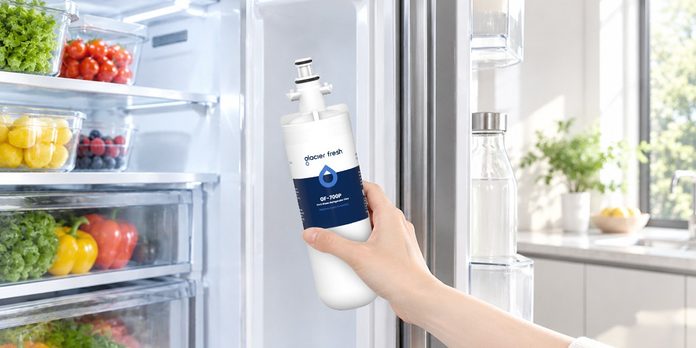

A refrigerator water dispenser provides convenient access to chilled drinking water, while a built-in ice maker makes preparing cold beverages easier. To keep these features working properly, homeowners need to maintain the refrigerator’s water filtration system and replace the filter when necessary.
Replacing a refrigerator filter is often a straightforward task that can be completed at home by following the appliance manufacturer’s instructions. However, choosing the correct cartridge and installing it properly are essential for avoiding leaks and maintaining filtration performance.
If your refrigerator requires an lg lt700p water filter, this guide will help you understand how to identify the correct replacement, remove the old cartridge, install the new one, and check that everything is working as expected.
Step 1: Identify Your Refrigerator’s Filter Model
Before purchasing a replacement, confirm which filter your refrigerator requires. LG manufactures several refrigerator filter models, and they are not all interchangeable.
The LT700P is designed for compatible refrigerator models that use this cartridge. Related part numbers may include ADQ36006101 and ADQ36006102, but compatibility should always be verified using the refrigerator’s complete model number.
Check the label on your existing cartridge or consult your owner’s manual. If the label is difficult to read, look up the refrigerator model in the manufacturer’s compatibility information.
When purchasing an lg refrigerator water filter, do not rely on appearance alone. Two cartridges may look similar while having different connections or fitting requirements.
Step 2: Prepare the Replacement Filter
Once you have confirmed compatibility, read the instructions supplied with the replacement cartridge.
Remove the new filter from its packaging and check that the cartridge is undamaged. Remove protective caps or packaging materials as directed by the manufacturer.
Keep the new filter clean while preparing for installation. Avoid touching connection points unnecessarily, and do not modify the cartridge to make it fit.
It is also helpful to have a clean cloth available in case a small amount of water escapes during removal.
Step 3: Remove the Old Filter
The location and removal mechanism depend on the refrigerator model. Some LG refrigerators have an internal filter compartment, while others use a different arrangement.
Follow the owner’s manual to locate the cartridge and release it correctly. Depending on the design, you may need to rotate the filter, press a release mechanism, or follow another specified procedure.
Remove the old cartridge carefully. Do not force it if it feels stuck. Check the instructions again before applying additional pressure, because incorrect removal can damage the housing.
Once the old filter is removed, inspect the compartment for visible damage or debris. Clean the surrounding surfaces only as recommended by the manufacturer.
Step 4: Install the New Cartridge
Align the replacement filter with the housing according to the installation instructions. Insert it carefully and secure it using the specified locking mechanism.
The cartridge should fit correctly without excessive force. If it does not align, double-check the model number and installation position rather than attempting to modify the filter.
A properly fitted cartridge helps create the intended seal and allows water to pass through the filtration system. An incorrect or poorly seated filter may cause leakage or prevent normal dispensing.
After installation, check that the cartridge is secure before moving to the next step.
Step 5: Flush the New Filter
Many refrigerator filters require flushing before regular use. This process helps clear trapped air and loose carbon particles from the new cartridge.
Follow the exact flushing instructions in your refrigerator manual or filter documentation. The recommended volume and procedure can vary by model, so avoid assuming that every filter requires the same amount of water.
During flushing, you may initially notice small air bubbles or slight cloudiness. These can occur as trapped air moves through the system. If the water remains unusual after the recommended flushing procedure, investigate further before continuing normal use.
Step 6: Check for Leaks and Reset the Indicator
After installation and flushing, inspect the filter compartment and surrounding area for signs of leakage.
If you notice water escaping, follow the manufacturer’s troubleshooting instructions and stop using the dispenser until the issue is resolved. Check whether the cartridge is correctly seated and compatible with the refrigerator.
Some refrigerators include a filter indicator that needs to be reset after replacement. Use the owner’s manual to locate the appropriate control and follow the reset procedure.
Resetting the indicator helps you keep track of the next replacement interval.
Step 7: Maintain a Regular Replacement Schedule
Replacing a filter once does not eliminate the need for ongoing maintenance. Filters have a limited rated capacity, and their replacement intervals depend on the specific model and water usage.
LG generally recommends replacing the LT700P approximately every six months or after its rated capacity of 200 gallons is reached, whichever comes first. Confirm the applicable instructions for your refrigerator.
Record the installation date on a calendar or set a reminder on your phone. This simple habit can help prevent overdue replacements.
Common Replacement Mistakes to Avoid
Avoid purchasing a cartridge without checking compatibility. Do not force a filter into the housing, ignore installation instructions, or skip the recommended flushing procedure.
If water flow remains slow after replacement, inspect the water supply and installation. Low water pressure, a kinked supply line, or another appliance issue may be responsible.
Conclusion
Replacing a refrigerator water filter is a manageable maintenance task when you follow the correct instructions. Identifying the model, installing the cartridge securely, flushing it properly, and checking for leaks all contribute to reliable operation.
For refrigerators designed to use the lg lt700p water filter, selecting a compatible replacement is the first important step. By maintaining your lg refrigerator water filter on schedule, you can help support consistent water delivery and convenient everyday use.