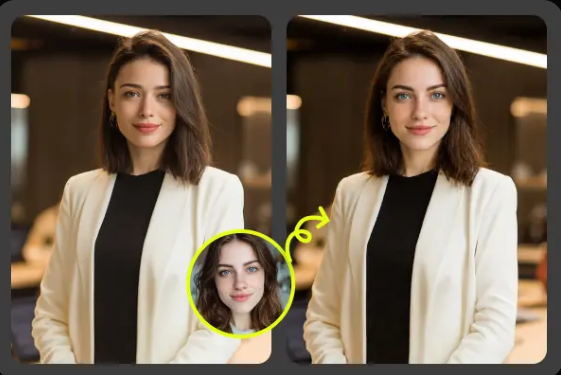

A profile picture has to do a lot of work in a tiny square. It needs to look like you, fit the platform, and show the right mood before anyone reads your bio. That’s easy when you have a recent shoot, good lighting, and a pile of polished images. Most of us don’t.
AI face swap tools can help when you want a fresh profile image without booking a photographer or learning complex editing software. With a tool like Photo Face Swap, you can place your face into a new portrait style, outfit, setting, or theme while keeping the result personal. Used well, it’s not about pretending to be someone else. It’s about testing creative versions of yourself before choosing the one that feels right.
I’ve used face swap workflows for creator headshots, social media tests, and themed profile images where the original photo was fine but not quite strong enough. The best results come from matching angle, lighting, and expression, not from picking the most dramatic template. EasyFaceSwap makes that process simple enough that you can try several directions in one sitting and compare them like a mini photo shoot.
Scenario 1: Refreshing a Personal Brand Headshot
A personal brand profile picture needs to feel clear, current, and easy to trust. That applies to consultants, coaches, freelancers, writers, and anyone who gets found through LinkedIn, X, Substack, or a personal website. The problem is that most casual photos don’t quite work as brand images. The background may be messy, the crop may be too wide, or the outfit may not match the tone you want.
AI face swap is useful here because you can keep your real face and test polished portrait styles without changing your whole identity. For example, a freelance marketer might try a clean studio headshot, a warm office portrait, and a more casual creator style. Each one sends a slightly different message. The studio version may feel more professional, while the casual version may feel more approachable.
The benefit is speed and choice. Instead of paying for a shoot before you know what direction works, you can test visual angles first. I usually suggest starting with a clear source photo where the face is front facing or only slightly turned. If the source photo has soft shadows and a natural expression, the swapped result is more believable. A stiff selfie with harsh overhead light often gives you a stiff final image too.
This use case works best when you treat the result as a brand draft, then choose the image that matches your actual work. If you’re a lawyer, a fantasy background will likely hurt trust. If you’re a creative director, a more styled portrait may help you stand out. The goal is not to make yourself look perfect. It’s to make your first impression match the way you want clients or followers to see you.
Scenario 2: Creating Fun Social Media Avatars
Not every profile picture needs to look like a passport photo. On TikTok, Discord, YouTube, gaming platforms, and casual social accounts, a little personality can be the whole point. AI face swap lets you turn a normal selfie into a themed avatar, such as a retro movie poster look, a cyberpunk portrait, a fantasy character, or a clean cartoon style.
The value here is creative control without starting from scratch. You can keep your facial features recognizable while changing the setting, clothing, or mood. That makes the image feel more personal than a generic avatar. It also gives you a way to match a channel theme or content niche. A gaming creator might use a dramatic character portrait, while a book reviewer might use a cozy library scene.
I’ve seen this work especially well for people who don’t want to show a raw selfie online but still want their profile to feel human. A face swapped avatar can sit between full anonymity and a plain photo. It gives viewers a visual anchor while letting you protect a bit of privacy. That said, you should still avoid using someone else’s identity or making the image misleading in a serious setting.
The main trade off is that highly stylized images can age fast. A profile picture based on a trend may look fun for a month and dated soon after. If you want something lasting, choose a style that fits your personality, not just what’s popular this week. Strong color, clear face detail, and a simple background usually work better than busy effects.
Scenario 3: Matching Profile Pictures to Campaigns or Seasons
Seasonal and campaign based profile pictures are common for creators, small brands, and community managers. You might want a holiday version, a launch week version, a conference themed version, or a profile image that matches a new content series. The challenge is making these updates look planned instead of random.
AI face swap helps because you can keep the same face and general composition while changing the styling. That gives your profiles a consistent base, even when the theme changes. A podcast host might use a formal portrait for the main season, then switch to a brighter version for a summer series. A streamer might use the same face angle across different event graphics so followers still recognize the account quickly.
The benefit is consistency. When every platform uses a different photo, people can wonder if they’re in the right place. A set of face swapped images can create a family look across LinkedIn, Instagram, YouTube, and a newsletter. The background and outfit can shift, but your face stays familiar.
Here’s a simple way to think about style choices before generating several images:
| Profile goal | Best visual style | Watch out for |
|---|---|---|
| Professional trust | Clean headshot, simple background | Overly smooth skin |
| Creator personality | Colorful portrait, expressive mood | Busy details around the face |
| Gaming or fandom | Character inspired avatar | Looking too unlike yourself |
| Seasonal campaign | Themed colors and props | Short lived trends |
| Privacy friendly presence | Stylized but recognizable image | Misleading identity cues |
Seasonal images are also helpful when you’re testing engagement. If a brighter or more expressive profile image leads to more profile visits, replies, or follows, that’s useful feedback. Just don’t change everything at once. If you update your banner, bio, name, and profile picture in the same week, you won’t know what made the difference.
Scenario 4: Improving Low Quality but Meaningful Photos
Sometimes the best photo of you is not the best technical photo. Maybe it’s from a trip, a graduation, a family moment, or an event where you looked genuinely happy. The expression feels right, but the lighting, background, or framing makes it hard to use as a profile picture.
This is where AI face swap can be practical rather than flashy. You can use that meaningful photo as the face source, then place it into a cleaner portrait setup. The final image may keep the warmth of the original expression while removing distractions. For people who feel awkward in planned photo shoots, this can produce a more natural result than posing again.
The key is to respect the original expression. If your source photo has a big smile, choose a target image with a similar smile. If your face is turned slightly left, pick a target with the same angle. When angle and expression fight each other, the result can look odd even if the tool does a decent job. A natural match beats a dramatic mismatch almost every time.
This use case is also helpful for people returning to professional life after a break. You may not have a recent headshot, but you may have a good casual image from the last year. AI face swap gives you a way to create a cleaner profile picture while you wait for a proper shoot. It’s not a full replacement for professional photography, but it can bridge the gap well.
A Practical Workflow for Better Results
Start by choosing your source photo carefully. Look for a clear face, open eyes, even lighting, and a natural expression. Avoid sunglasses, heavy filters, strong side shadows, and extreme angles. If the face is blurry in the source image, the final result usually won’t look crisp. AI can do a lot, but it can’t fully recover detail that isn’t there.
Next, pick target images that match the face position. This matters more than most people think. A front facing source photo works best with a front facing target. A slight turn can work too, as long as both images turn the same way. Matching expression is just as important. A closed mouth source swapped onto a wide smile target may create strange lips or teeth.
Generate several versions before judging the idea. One output can fail because of a tiny mismatch, while the next one looks good with a better target. I like to make three to five options in the same style, then compare them at small size. That’s how most people will see your profile image anyway. If it only looks good when zoomed in, it may not be strong enough for a profile picture.
After you choose a favorite, check it for realism and platform fit. Look at the jawline, eyes, hairline, ears, and skin texture. These are common spots where swaps can show flaws. Then crop it into a square and preview it as a tiny circle, since many apps display profile photos that way. If the face gets lost, choose a closer crop or a cleaner background.
Finally, use the image honestly. For casual avatars, creative styling is expected. For professional profiles, keep it close to how you really look. If someone meets you on a video call and the profile picture feels like a totally different person, trust drops fast. A good AI profile picture should feel like the best version of a real you, not a stranger with your name.
Conclusion
AI photo face swap is most useful when it solves a real profile picture problem: no recent headshot, poor lighting, weak branding, seasonal content needs, or a desire for a more creative avatar. It gives you room to experiment before you commit to one public image. That can save time, reduce stress, and help you find a look that fits the platform.
The strongest results come from simple choices. Use a clear source photo, match the angle and expression, keep backgrounds clean, and judge the final image at profile size. Don’t chase perfection or hide behind a version of yourself that feels false. A creative profile picture works best when people can still recognize you and understand the message you want to send.