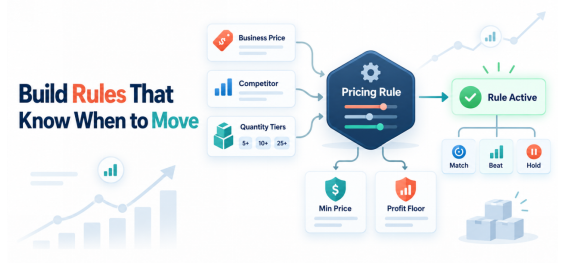

Creating a B2B repricing rule is not simply a matter of choosing “match the lowest price” and switching on automation.
Before the rule can make useful decisions, it needs clear instructions. You must decide which products it will manage, what competitive position it should target, how low the price can move and what should happen when competition changes.
This is especially important for Amazon Business sellers because one product may have a standard price, a business price and several quantity discount tiers. A rule that works for a single-unit retail offer may not work for a buyer ordering 10, 25 or 50 units.
A strong rule should respond to the market while protecting your margin. This walkthrough explains how to configure that rule in a controlled and practical way.
Define the Goal Before Opening the Settings
Every repricing rule should have one clear objective.
Do not begin by selecting random settings and hoping they work together. First, decide what you want the rule to achieve.
Your goal might be to:
- Compete for the Business Featured Offer
- Keep your business price below your standard price
- Protect a fixed minimum margin
- Match a relevant competing business offer
- Maintain competitive quantity discounts
- Increase prices when competition becomes weaker
One rule should not try to achieve every objective at once. If different products need different outcomes, create separate rules.
For example, a high-volume office supply may need an aggressive Featured Offer strategy. A specialist product with limited competition may need a margin-focused rule that avoids unnecessary price reductions.
Step 1: Choose the Products the Rule Will Manage
Begin with a small and relevant group of SKUs.
Products assigned to the same rule should have similar:
- Margins
- Competitive conditions
- Order quantities
- Fulfilment costs
- Pricing goals
- Stock availability
Avoid placing your entire catalogue under one general rule. A 10% price movement may be acceptable for one product but unprofitable for another.
Start with a small test group of products that already receive B2B traffic or multi-unit orders. This makes it easier to understand how the rule behaves before applying it more widely.
Step 2: Confirm Your Business Price Structure
Before automation begins, review the current price structure for every selected SKU.
A product may include:
- A standard consumer price
- A single-unit business price
- Quantity discounts at different thresholds
Make sure the relationship between these prices is logical.
Your business price should provide a clear benefit to an eligible business customer. Every higher quantity tier should then offer a lower effective per-unit price than the tier before it.
For example:
| Purchase Quantity | Price Per Unit |
| 1–4 units | $20.00 |
| 5–9 units | $19.00 |
| 10–24 units | $18.00 |
| 25+ units | $17.00 |
If a higher tier produces a more expensive per-unit price, the structure needs to be corrected before repricing begins.
Step 3: Select the Competitive Reference
A repricing rule needs a reference point. This tells the system which market price or offer it should consider when making a decision.
Depending on the available rule type, the reference may be:
- The Business Featured Offer
- The lowest eligible competing price
- Your standard Amazon price
- A defined amount or percentage below another price
- The current selling price
Choose the reference that matches your goal.
If your objective is to compete for the Business Featured Offer, the relevant business offer may be the best reference. If your goal is to keep business prices connected to your consumer prices, a percentage below the standard price may be more appropriate.
Amazon’s official guide to automated pricing rules explains that sellers can use competitive, sales-based and business price or quantity discount rules. It also confirms that sellers can apply minimum and optional maximum prices to help control margins.
Step 4: Decide How the Rule Should Respond
Next, define the action the rule should take when it detects the selected reference price.
Common actions include:
- Match the reference price
- Price a fixed amount below it
- Price a percentage below it
- Remain a fixed amount above it
- Increase the price when competition disappears
The correct action depends on your product.
Matching the lowest price may be reasonable in a highly competitive category, but it is not always necessary. Your offer may still be attractive because of faster delivery, stronger seller performance or better availability.
A rule should respond only as aggressively as the commercial situation requires.
Step 5: Set Your Minimum and Maximum Prices
Your minimum price is one of the most important settings in the rule. It prevents the system from reducing the offer below the lowest price you are willing to accept.
Calculate it using:
- Product cost
- Amazon fees
- Fulfilment or shipping expenses
- Packaging costs
- Expected returns
- Required profit
Do not guess this number. A minimum price based only on product cost can still produce an unprofitable order after fees and fulfilment expenses are included.
You can also set a maximum price where the system allows it. This prevents the price from moving too high when competition becomes limited.
Your boundaries should give the rule enough room to respond without allowing it to make commercially unacceptable changes.
Step 6: Configure Quantity Tiers Carefully
B2B rules become more complex when quantity discounts are involved.
Each tier represents a different effective price and may face a different competitive situation. You could be competitive at five units but too expensive at 25 units.
Review each threshold separately and confirm:
- The threshold matches real customer order behaviour.
- The per-unit price decreases as quantity increases.
- The discount is large enough to influence the buyer.
- The final price remains above your minimum.
- You have enough inventory to fulfil the order.
This is where Amazon B2B Repricing can help sellers manage different quantity levels more consistently. The objective is to keep each important tier responsive without allowing the discounts to cross the seller’s pricing boundaries.
Step 7: Add Competitive Filters Where Available
Not every competing offer should influence your price.
Your repricing system may allow you to decide which competitors qualify based on conditions such as:
- Fulfilment method
- Seller feedback
- Shipping time
- Item condition
- Seller location
Use these filters carefully.
If you fulfill through FBA, you may not want a slow merchant-fulfilled offer to control every price movement. On the other hand, excluding too many sellers could cause the rule to ignore offers that buyers genuinely consider.
Your filters should reflect real competition, not simply remove every seller whose price is difficult to match.
Step 8: Decide What Happens When Competition Changes
A complete rule needs instructions for more than one situation.
Consider what should happen when:
- A competitor lowers their price
- A competitor raises their price
- The Featured Offer changes
- A competing seller runs out of stock
- No eligible competitor remains
- Your minimum price is reached
Many sellers focus only on downward price movement. This can leave products sitting near their minimum even after the competitive pressure disappears.
Your rule should have a path for price recovery. If a lower-priced competitor leaves the listing, the system should be able to test a higher price within your defined limits.
Step 9: Test the Rule Before Expanding It
Do not apply a new rule to hundreds of SKUs immediately.
Choose a small product group and monitor it under real market conditions. Check whether prices move in the way you expected.
During the test, review:
- Why each price changed
- Which competitor triggered the response
- Whether the minimum price was respected
- How quantity-tier prices behaved
- Whether prices recovered when competition changed
- Whether Featured Offer performance improved
If the rule produces unexpected results, pause it and adjust the settings. Testing with a small group limits the commercial risk.
Step 10: Measure the Business Result
A repricing rule should be judged by business outcomes, not by the number of price changes it makes.
Compare performance before and after activation. Review at least 30 days where order volume allows.
Focus on:
- Business Featured Offer percentage
- B2B conversion rate
- Orders and units sold
- Average selling price
- Average order quantity
- Margin per order
A higher Featured Offer win rate is not automatically a success. If the rule wins more often by keeping every product at its minimum price, revenue may increase while profit declines.
The right result is stronger profitable performance.
Review the Rule Regularly
Market conditions do not remain fixed. Product costs, competitor behaviour, fulfilment fees and buyer demand can all change.
Review the rule whenever:
- Your costs increase
- Margins decline
- A major competitor enters or leaves
- Business sales fall
- Quantity tiers receive little use
- Inventory levels change significantly
Even a well-configured rule can become unsuitable if the assumptions behind it are no longer correct.
Build the Logic Before You Automate It
A B2B repricing rule is only as good as the decisions built into it.
Start with a clear objective. Group similar products, select the right competitive reference and calculate accurate pricing limits. Then test the rule on a small number of SKUs before expanding it.
Effective Amazon B2B Repricing does not remove pricing strategy from the seller. It turns that strategy into instructions that can be applied consistently as the market changes.
The best rule is not the one that changes prices most often. It is the one that keeps your offer competitive while protecting the value of every order.