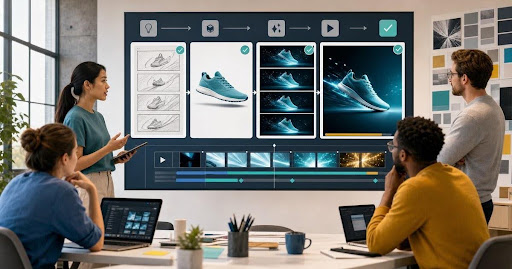

An AI video generator helps teams turn written ideas, product visuals, brand references and still images into short motion assets without starting every campaign from a blank editing timeline. That matters because modern campaigns rarely need one perfect video. They need many fast, consistent versions for ads, landing pages, social posts, email, product launches and sales enablement.
The shift is not simply about replacing editors or production teams. The practical value is speed at the early creative stage: turning a concept into something visible, reviewable and ready for direction. When a marketing team can see motion options in minutes, it can test angles, refine messaging and decide what deserves deeper production budget.
What an AI video generator actually does
At a basic level, an AI video generator uses prompts, images, references or existing creative assets to produce moving visuals. A team might start with a product photo, a campaign concept, a static banner or a storyboard frame, then generate short clips that show movement, atmosphere, transitions or product context. For teams that need campaign-ready output, an AI video generator for creative teams is most useful when it sits inside the broader creative workflow instead of acting like a one-off novelty tool.
Traditional video production usually begins with planning, shooting, editing, animation, rendering and rounds of approval. That process is still valuable for premium campaigns, but it can be slow when the team only needs to explore ideas or produce lightweight motion assets. AI changes the front of the workflow. It gives teams a way to move from concept to visible direction before committing to a full shoot or detailed animation pass.
Campaign video use cases for marketing teams
The strongest use cases are the ones where speed, volume and variation matter. A brand team may need a short product teaser for a launch page, a vertical social clip for paid ads, a looping motion background for an event screen or a quick visual proof for a client presentation. Instead of treating every asset as a separate production job, teams can create several controlled options from the same campaign idea.
For ecommerce, AI video can help turn product stills into motion-led display assets. For agencies, it can support concept decks and pitch visuals. For SaaS teams, it can create abstract product storytelling clips, animated feature moments and social snippets. For creators, it can turn static visual identity into short-form content without requiring a full studio setup.
From static assets to motion
Many teams already have the ingredients for motion: product photography, campaign graphics, packaging visuals, brand colors, hero images, mockups and social templates. The missing layer is movement. An image to video generator can help bridge that gap by animating a still asset while preserving the basic subject, mood and visual direction.
This is especially useful when the team wants to extend one creative idea across many formats. A single product image can become a launch teaser, a paid social variant, a website motion block and a presentation opener. The important part is not generating random movement. The important part is using motion to support the campaign message: reveal the product, show a transformation, create visual energy or guide the viewer toward the next action.
A practical workflow for marketing teams
The best results come from treating AI video as a workflow rather than a single prompt. Teams should begin with the campaign goal, define the visual job of the clip, prepare brand references and then generate variations that can be reviewed against a clear standard.
First, define the purpose of the motion asset. Is it meant to attract attention in a feed, explain a product benefit, create a launch mood or support a sales narrative? A clear job keeps the output focused. Second, choose the source asset. This may be a product image, mockup, key visual, concept frame or prompt. Third, create a few controlled motion directions, such as slow reveal, product rotation, environment movement, background energy or cinematic transition. Fourth, review the output for brand fit, clarity, readability and channel requirements before publishing.
This is where connected systems matter. Teams often need image creation, video generation, asset management, mockups and review in the same production rhythm. A broader set of AI tools for creative production can make the process easier because the team is not constantly moving files between disconnected apps.
Quality checks before publishing AI motion assets
Fast generation does not remove the need for human review. Before a clip goes live, the team should check whether the subject remains accurate, the brand cues feel consistent, and the motion supports the message instead of distracting from it. If a product changes shape, a logo becomes distorted, text becomes unreadable or lighting feels mismatched, the clip needs another pass.
Resolution and format also matter. A clip for a vertical ad has different needs from a website hero, a presentation loop or a product launch teaser. Teams should review dimensions, safe zones, crop behavior, file size, frame pacing and platform limits. A useful campaign video generator does not just produce motion; it supports motion that can actually be used in real marketing channels.
Why AI video works best with human direction
AI can accelerate options, but it still needs a strong creative operator. Human direction decides the audience, offer, message, pacing, brand tone and final approval standard. Without that layer, teams often get attractive clips that do not clearly serve the campaign.
The most effective teams use AI video creator tools to shorten the distance between idea and review. They do not skip strategy. They use AI to visualize more directions, compare more options and reach stronger decisions faster. That is the difference between random generation and production-focused creative work.
How this supports creative teams and agencies
Creative teams are under pressure to produce more assets for more channels without losing brand control. Agencies face the same pressure from clients who expect quick concepts, faster approvals and multiple versions of every idea. AI motion creator workflows can help both groups move faster while keeping a structured review process.
For internal teams, the benefit is speed and consistency. For agencies, the benefit is showing clients a more complete campaign vision earlier in the process. A static concept can become a motion direction. A product mockup can become a launch teaser. A presentation can include movement that makes the idea easier to understand. The result is not just more content; it is clearer decision-making.
FAQ
What is an AI video generator?
An AI video generator is a tool that creates video clips from text prompts, images, references or existing creative assets. It helps teams create motion ideas faster without building every clip manually from scratch.
Can AI video generators be used for marketing campaigns?
Yes. Marketing teams can use AI video generation for social clips, product teasers, ad variations, pitch visuals, event content and early campaign concepts that need quick review.
What is the difference between an AI video creator and an AI motion creator?
The terms often overlap. AI video creator usually refers to generating complete video clips, while AI motion creator can describe turning static campaign assets into moving visuals.
Can AI turn images into videos?
Yes. Image to video tools can animate a still image by adding camera movement, subject motion, environmental effects or transitions while keeping the original visual direction.
Do AI-generated videos still need editing?
Usually, yes. Teams should review pacing, crop, resolution, brand consistency, audio, captions and platform requirements before publishing the final asset.
What makes AI video useful for creative teams?
The main value is faster creative exploration. Teams can produce more visual options, review campaign ideas earlier and create channel-specific motion assets without slowing down the whole workflow.
Conclusion
AI video generation is becoming a practical part of campaign production because it helps teams turn static ideas into motion while there is still time to improve the concept. The strongest use is not replacing creative direction. It is giving marketers, designers and agencies a faster way to explore, review and prepare motion assets for real channels. When used with human judgment, brand control and a connected workflow, an AI video generator can help teams move from campaign idea to publish-ready motion asset with far less friction.