
A trend story can change between the morning pitch meeting and the afternoon publish window. A new number arrives, a source clarifies a claim, or the angle that looked obvious at 10 a.m. feels dated by 3 p.m. For editorial teams producing short-form video alongside written coverage, the challenge is to move quickly without letting the visual version outrun the reporting.
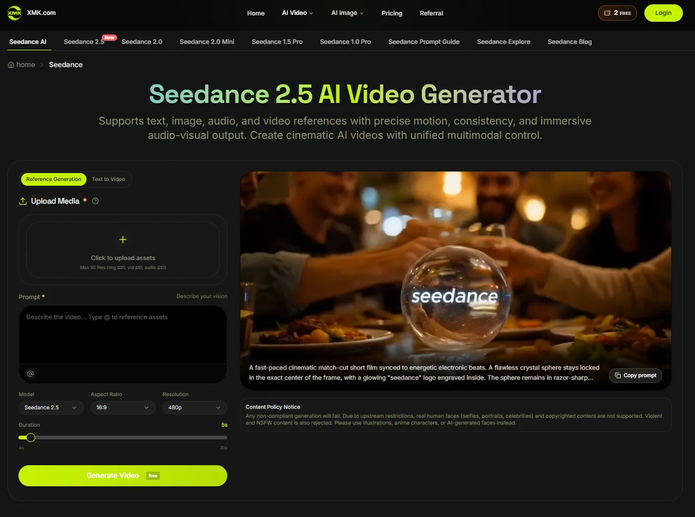
For teams experimenting with XMK Seedance, that pace creates a useful constraint: don’t start by asking how to turn the whole article into a video. Ask which part of the story actually benefits from being visual.
A reported article and a short social clip don’t carry information in the same way. The article can explain background, cite sources, qualify uncertain claims, and introduce several perspectives. A short video usually needs one clear idea.
The editorial task is therefore not compression. It is selection.
Start With the Reporting, Not the Video
A trend video should begin with the same question as the written story:
What do we actually know?
Before anyone writes a visual prompt, the reporting team should establish a small source packet containing verified facts, source links, checked quotations, approved statistics, relevant dates and locations, known uncertainties, and anything that should not be visualized.
That packet becomes the boundary for the video team.
Generation can help visualize an editorial idea, but it should not invent the reporting.
Unknowns should stay unknown. If a developing story has not established what happened at a particular location, who was present, or why an event occurred, generation should not fill those gaps with plausible-looking details.
A scene can look convincing without being true.
Find the One Visual Idea
Not every part of an article needs to appear in the video.
Imagine an editor working on a story about renewed interest in overnight train travel. The full article might examine ticket prices, environmental concerns, routes, traveler preferences, and railway investment.
Trying to squeeze every strand into one short clip would create a rushed summary.
Instead, define a narrower purpose:
Possible visual angle: Show the contrast between an overnight rail journey and the short-haul travel routine the story is examining.
The written story can carry the numbers, interviews, qualifications, and broader analysis. The video has a narrower job: introduce one aspect of the trend clearly.
Build a Shot Brief Before a Prompt
Once the visual angle is clear, avoid jumping directly into a long generation prompt.
Write a short shot brief first:
Story: Renewed interest in overnight rail
Purpose: Introduce the trend
Opening: Generic station environment late at night
Middle: Train departing as city lights pass outside
Close: Morning arrival
On-screen fact: Added later from verified editorial copy
Avoid: Invented station names, fabricated quotes, unsupported route details
This separates two things that are easy to confuse:
What the newsroom wants to say and what the generated scene should show.
The prompt comes after that decision.
Separate Evidence From Illustration
A generated image of a busy railway station is an illustration. It is not evidence that a particular station was crowded on a particular night.
A generated visualization of apartment construction can help explain a housing trend. It does not document a real development. A generated street scene can establish atmosphere, but it should not be presented as footage of an actual event.
If photographs, charts, screenshots, maps, documents, or verified footage are necessary to establish a factual claim, preserve the original assets rather than asking a generative model to recreate them.
There is another important distinction: publication rules differ between news organizations.
Whether generated imagery can appear in a published story depends on the newsroom’s own standards. If a publication permits it and a reasonable viewer could mistake synthetic material for documentary footage, it should be identified and contextualized according to that publication’s policy.
Some newsrooms apply stricter rules and may prohibit generated imagery in published news visuals even when it is labelled. In those organizations, a generated sequence should remain an internal storyboard or previsualization and be replaced with verified footage, original graphics, or other policy-approved material before publication.
The Associated Press provides a useful example. Its current newsroom standards continue to prohibit generative AI from creating, altering, or enhancing news photography. AP separately provides rules for cases where AI-generated or manipulated material itself is relevant to the journalism, including requirements to identify it and provide appropriate context.
So the practical rule is not simply:
Generate → Disclose → Publish
It is:
Check newsroom policy → Determine permitted use → Generate only within that boundary → Verify, replace, label, and review as required
For some teams, generation may contribute to a published visual. For others, its appropriate role may stop at internal planning.
Use References Carefully
References can help communicate a consistent visual direction. A small reference packet might contain a color palette cleared for the workflow, a generic environment, an illustration style, a motion example, or an audio pacing reference.
Give each input a clear purpose:
station_reference.jpg → environment
night_palette.png → color direction
train_motion.mp4 → movement
audio_reference.mp3 → pacing
But access to an asset does not automatically mean permission to upload it to an external AI service.
Internal screenshots, embargoed material, unpublished photographs, licensed assets with processing restrictions, and confidential source material should stay outside the workflow unless the newsroom has confirmed that external processing is permitted.
Removing names or obvious identifiers does not create that permission. Confidential source material should remain outside the workflow even after superficial de-identification.
Keep Exact Information Outside the Generation Layer
Dates, statistics, quotations, headlines, maps, company names, logos, charts, product packaging, and document screenshots may need to remain exact.
Treat them as verified editorial assets rather than generation targets.
If a story needs a label saying “Ridership increased 18%,” create clean space for it in the visual composition and add the verified statistic during editing.
If geographic accuracy matters, use the approved map. If the exact appearance of a logo, product, chart, or document matters, preserve the original and composite it into the edit.
This separation also makes developing stories easier to update. A corrected statistic can be replaced without rebuilding the illustrative sequence.
Generate a Draft, Not Evidence
Once the angle and reference boundaries are defined, generation becomes easier to manage.
A Seedance video workflow on XMK can sit at this draft stage. Its role here is visualization—not reporting, verification, or final editorial approval.
And in a newsroom whose policy does not permit generated imagery in published news visuals, that draft should remain an internal planning asset rather than move into the final cut.
Editors still need to check whether the scene communicates the intended idea, whether synthetic details could be mistaken for facts, and which elements need to be replaced with verified source material.
A visually convincing result isn’t automatically an editorially acceptable one.
Bring the Factual Layer Back During Editing
Where newsroom policy permits the workflow to proceed toward publication, bring verified material back during editing: exact text, original charts and maps, approved graphics, source footage, attribution, and required disclosure.
For workflows limited to internal previsualization, use the generated draft only to plan pacing, composition, or shot requirements, then rebuild the publishable sequence from policy-approved material.
Either way, the generated draft and the factual record should remain distinct.
Keep a Lightweight Production Record
Fast-moving stories produce versions quickly. Keep a simple record of the story slug, prompt/reference version, verified assets, reviewer, approval status, and final export.
The goal is not more paperwork. It is being able to answer:
Where did the important elements in this video come from?
A Practical Editorial Pipeline
The workflow can stay compact:
1. Verify — Establish facts, sources, unknowns, and editorial boundaries.
2. Select — Choose the idea that benefits from visualization.
3. Brief — Define the shots and what must remain exact.
4. Prepare — Clear references for the intended external workflow.
5. Draft — Generate only within newsroom policy and treat the result as illustrative.
6. Edit and verify — Replace or supplement the draft with verified, policy-approved assets as required.
7. Approve and archive — Complete editorial review and retain enough information to trace the final material.
Generation is one stage of the workflow, and in some newsrooms it may be an internal stage only.
Speed Comes From Better Decisions
The temptation with trend coverage is to equate speed with automation.
But speed often comes from making the boundaries clearer: know what has been verified, choose one visual idea, keep exact information outside generation, and decide before production whether synthetic imagery is permitted in the published work at all.
The practical workflow isn’t:
Article → AI → Video
It is:
Reporting → Visual Angle → Brief → Policy Check → Draft → Editorial Review → Verified Edit → Publish
The point isn’t to remove experimentation. It’s to make sure a fast visual draft never outruns the reporting—or the editorial standards—behind it.