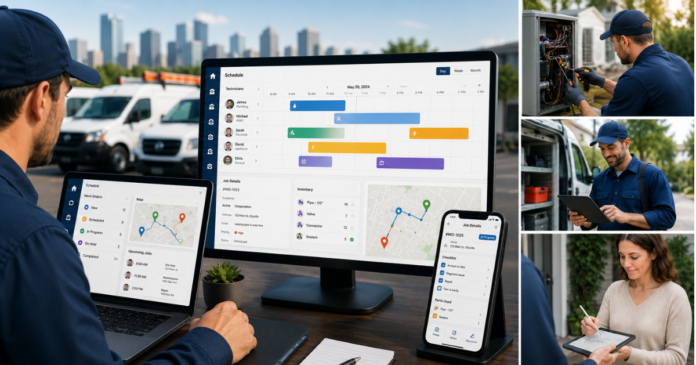

You manage field teams, schedules, and customer promises — and field service software turns those moving parts into a single, reliable system. It streamlines work orders, schedules, parts, and communications so you can dispatch the right technician faster, reduce travel time, and close more jobs on time.
This article Field Service Software walks through the core features that make that efficiency possible and shows how to implement and optimize the system so it fits your workflows and improves productivity. Expect practical guidance on scheduling and dispatch, mobile job execution, inventory control, and the setup steps that prevent common rollout problems.
Core Features and Functions
You need systems that turn service requests into completed, billable jobs with minimal friction. Focus on accurate work records, efficient schedules, and mobile tools that keep technicians productive and customers informed.
Work Order Management
Work order management centralizes everything about a job: customer details, problem description, parts required, priority, and billing codes. You should be able to create work orders from incoming calls, web forms, or recurring contracts, and link them to customer accounts and asset histories.
Use status fields (e.g., New, Scheduled, In Progress, On Hold, Completed) and timestamps to track progress and measure response times. Attachments matter: photos, diagnostic notes, and signed forms should store with the work order for compliance and future troubleshooting.
Automated escalation rules help you enforce SLAs by raising priority or notifying supervisors when jobs age. Integrations with inventory and procurement let you reserve parts against a work order and create purchase requests when stock is low. Reporting on completed work orders should support invoicing, profitability analysis, and technician performance metrics.
Scheduling and Dispatch
Your scheduling system should match jobs to technicians based on skills, certifications, location, and real-time availability. Use rule-based or AI-assisted matching to reduce travel time and ensure qualified staff handle specialized equipment. Visual dispatch boards and map views let dispatchers drag-and-drop assignments and see technician routes at a glance.
Include buffers for travel and unexpected overruns, and allow quick reassignments when emergencies occur. Automated ETA notifications and two-way SMS or in-app messaging keep customers and technicians aligned. Route optimization and workload balancing reduce fuel costs and overtime, while historical scheduling data helps forecast staffing needs.
Mobile Workforce Capabilities
Mobile apps must give technicians everything they need in the field: job details, customer history, asset records, parts lists, and step-by-step checklists. Ensure offline access so technicians can continue work in low-coverage areas and sync automatically when they reconnect.
Enable in-field actions like time capture, parts consumption, photo uploads, and electronic signatures to close work orders on-site. Barcode/QR scanning speeds parts verification and inventory updates. GPS-based time tracking and location stamps improve payroll accuracy and support dispute resolution.
Security matters: enforce role-based access, encrypt data in transit, and provide remote wipe for lost devices. Configurable forms and guided workflows reduce training time and ensure consistent data capture across teams.
Implementation and Optimization
Implementing field service software requires careful alignment of data sources, user workflows, and performance metrics to ensure fast adoption and measurable ROI. Focus on system links, stakeholder training, and continuous measurement to keep operations efficient and scalable.
Integration with Existing Systems
Map your core systems first: CRM, ERP, inventory, and payroll. Identify required data flows (work orders, customer records, parts levels, technician time) and define a single source of truth for each data element.
Use APIs or middleware to automate syncing and avoid manual CSV transfers. Prioritize real-time or near-real-time synchronization for dispatch status, inventory availability, and customer notifications. Document field-level mappings and error-handling rules before you start integration.
Plan phased cutovers: integrate CRM and scheduling first, then add inventory and finance. Test end-to-end scenarios with sample data and at least one pilot region. Maintain logging and rollback procedures so you can isolate failures without disrupting field crews.
Change Management Strategies
Identify early adopters and frontline champions among dispatchers and technicians. Give them hands-on training and authority to shape workflows; their buy-in reduces resistance and surfaces practical issues quickly.
Provide role-based training materials: step-by-step job completion guides for technicians, exception-handling scripts for dispatchers, and report dashboards for managers. Schedule short, repeated sessions and use microlearning (2–5 minute videos, checklists) to reinforce key tasks.
Set measurable adoption targets (e.g., 90% of work orders created in the system within 30 days). Use incentives for milestones and a clear support path (live chat, dedicated escalation contacts). Track feedback weekly and iterate UI/configuration to remove friction points.
Performance Analysis and Reporting
Define KPIs tied to business goals: first-time fix rate, mean time to repair (MTTR), technician utilization, travel time per job, parts stockouts, and customer satisfaction scores. Assign owners for each KPI and review cadence—daily for operations, weekly for supervisors, monthly for executives.
Build dashboards with filters by region, crew, and technician. Include drilldowns so you can move from a high-level trend to the specific work orders causing variance. Automate alerts for threshold breaches (e.g., MTTR above target, inventory < reorder level).
Use A/B tests when changing schedules, routing algorithms, or parts allocation. Collect baseline metrics, run the change for a defined period, and compare statistically significant results before scaling. Archive historical data to analyze seasonality and support forecasting improvements.